The Short-Form Audio Director: How to Structure and Pace AI Voiceovers for 60-Second Retention
Most creators treat AI voiceovers as a lazy afterthought. To win the algorithm, you must act as an audio director, using strategic pacing to hook viewers.
In the rapid-fire ecosystem of vertical video, the difference between a viral hit and an instant scroll-past is decided in the first three seconds. Most creators treat AI voiceovers as a mere utility—a quick way to translate text on a screen into basic audio without having to set up a physical microphone. This is a massive missed opportunity. When you rely on default, platform-native text-to-speech, you are signaling to the viewer that your content is generic, automated, and ultimately skippable.
To capture and hold attention in a crowded feed, you must shift your mindset from a passive content creator to an active audio director. By treating synthetic speech as a creative instrument rather than a robotic necessity, you can leverage advanced voice generation techniques to build a distinct brand identity that cuts through the noise. This is where platforms like Fanfun redefine the creative workflow, allowing you to move past generic robotic narrators and tap into a rich library of dynamic, character-driven AI voices that command attention from the very first frame.
The Death of the Monotone: Why Standard TTS Fails the Short-Form Scroll Test
The primary reason generic text-to-speech fails on platforms like TikTok, Reels, and YouTube Shorts is listener fatigue. When a user hears the same "Jessie" or "Joey" voice on every third video in their feed, their brain immediately categorizes the content as "low-effort," "faceless," or "ad-heavy." This triggers a subconscious scroll-away response before the viewer has even processed your hook. The human ear is incredibly sensitive to micro-inflections, and when those are missing, the brain checks out.
The solution is auditory pattern interruption. You need a voice that feels intentional—something that carries character, texture, and emotional resonance. To truly stand out, creators must understand how to move beyond the default 'Jessie' and direct a TikTok AI voice generator for high-retention short-form content. By accessing Fanfun’s library of celebrity-style and iconic character voices, you aren't just adding narration; you are casting a character. This creates an instant psychological hook because the voice carries existing cultural weight, disrupting the user’s scroll with something familiar, unexpected, and highly engaging.
The Anatomy of a High-Retention Short-Form Audio Script
A high-retention script is not just a block of text; it is a timed performance. When directing synthetic narrators for high-retention video essays and memes, you must account for the specific "speed-dating" nature of short-form algorithms. Every second of your 60-second timeline must be mapped out with specific auditory cues, pacing shifts, and emotional beats.
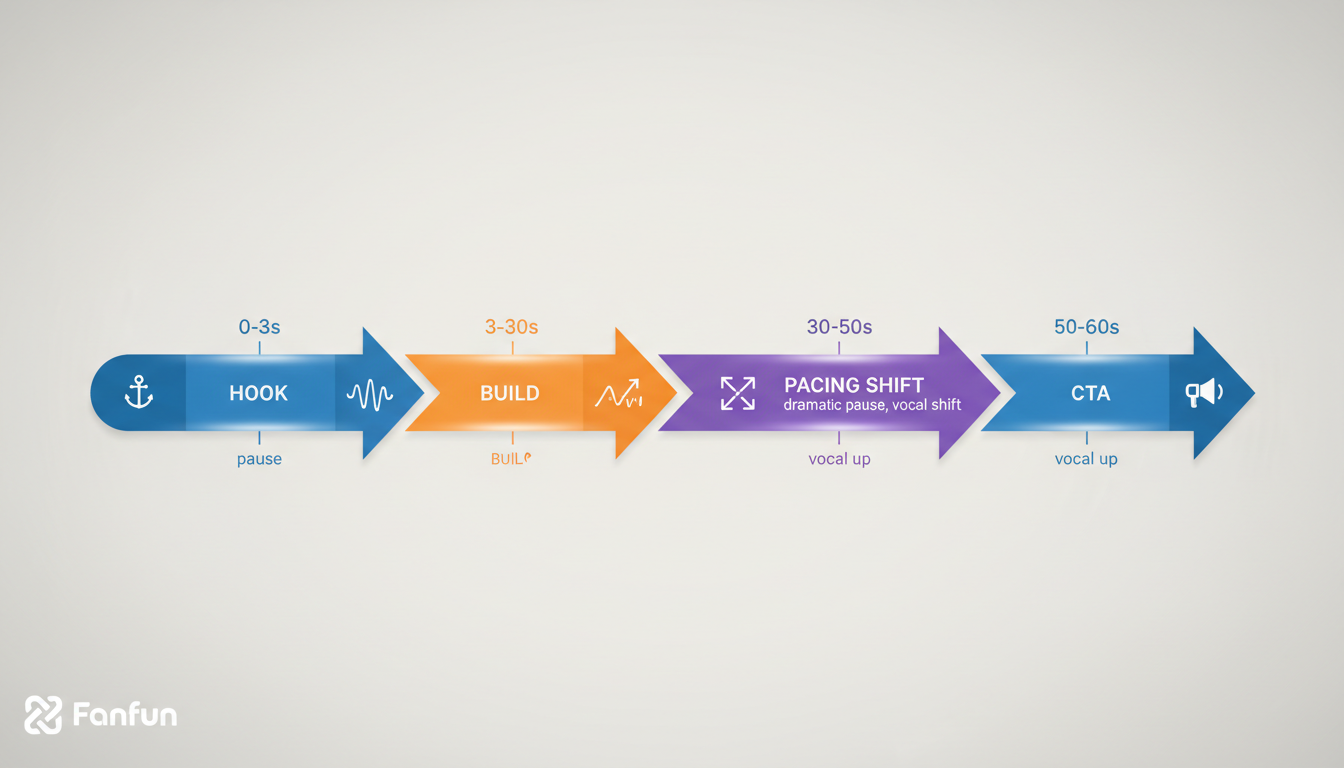
The 60-Second Pacing Framework
- 0-3 Seconds: The Auditory Hook. Start with a high-impact phonetic sound, a dramatic whisper, or a question delivered with intense urgency. Avoid introductory fluff like "Hey guys" or "Today I'm going to show you..." Go straight to the core conflict.
- 3-15 Seconds: The Setup and Tension. Maintain a rapid-fire delivery. Keep sentences short (under 10 words). Use active, punchy verbs. The AI voice should sound like it is sharing an urgent secret.
- 15-45 Seconds: The Pacing Shift (The Payoff). Slow down. When delivering the "value" or the core insight of your video, introduce a deliberate, slower cadence. This shift in speed signals to the viewer's brain that this is the most important part of the video, forcing them to focus.
- 45-60 Seconds: The Loop-back or CTA. Keep it frictionless. Use a rising tone to maintain energy right up to the final frame, ideally structuring your final sentence to loop seamlessly back into the opening hook.
Crucially, you must embrace the micro-pause. If your AI voice runs through your script like a runaway train, the viewer will quickly experience cognitive overload and swipe away. Leave empty space in your script for visual transitions, sound effects, or simply to let a heavy statement sink in. Silence, when deployed strategically, is one of the most powerful tools in an audio director's arsenal.
Directing the AI: Punctuation Hacks and Phonetic Spelling for Maximum Impact
AI voice engines are highly literal. If you provide a standard, grammatically perfect paragraph, the engine will read it with a flat, predictable cadence. To force the AI to emote, pause, and emphasize the right words, you must learn to write for the ear, not the eye. This requires mastering a specialized "Punctuation Toolkit" designed specifically for synthetic speech models.
Use commas to indicate short, natural breaths, and ellipses (...) to indicate a longer, dramatic pause. Dashes (—) can be used to signal an abrupt shift in tone or an excited interruption. If you need a specific word to carry extra weight, try capitalizing the entire word or adding a period immediately after it to force a hard stop.
For complex words, slang, or brand names, rely heavily on phonetic spelling. If your script mentions "Fanfun," and the AI struggles with the natural flow, writing it as "Fan-Fun" or "Fan Fun" forces the engine to pause or emphasize the syllables correctly. As detailed in our comprehensive guide on how to direct an AI voice generator beyond the text-to-speech trap, these small adjustments are the direct line between a synthetic-sounding clip and a professional, studio-grade production. Furthermore, if you are looking to deploy an instant voice clone, understanding these nuances is critical to success; check out our guide on how to deploy an instant AI voice clone without losing the human soul to master the art of natural-sounding synthetic replicas.
| Standard Script Writing | AI-Optimized Script Writing | Expected Auditory Result |
|---|---|---|
| Welcome to the show, today we explore AI. | Welcome to the show... today, we explore A-I. | A warm opening followed by a dramatic pause and clear, clean pronunciation of the acronym. |
| Check out Fanfun for voiceovers. | Check out Fan-Fun... for voice-overs. | A natural cadence that highlights the brand name with a brief, professional pause before the value proposition. |
| Why does this matter to you? | Why... does this. matter. to. you? | An intense, slow-motion delivery that forces the listener to lean in and contemplate the question. |
Choosing the Right Persona: Matching Voice Texture to Your Content Niche
The texture of the voice—whether it is husky, energetic, sarcastic, warm, or clinical—dictates the viewer's emotional state. If you are creating a comedic roast or a meme, a dry, monotone, or overly serious "authoritative" voice creates a hilarious, high-retention contrast. If you are creating a tutorial or an educational video, you want a voice that conveys competence, warmth, and approachable authority.

Leveraging cultural familiarity is your secret weapon. If your content is about sports, using an AI voice that carries the booming, dramatic cadence of a legendary announcer immediately establishes context without you needing to explain the premise visually. When creating highly specific formats, such as personalized greetings or promotional campaigns, matching the exact energetic tone of the voice to the script is essential. To see how to structure these highly engaging, celebratory formats, read our guide on how to script and direct an AI congratulations video that beats a boring card.
By selecting a persona that fits the vibe of your content, you make the AI voice feel like an intentional casting choice. To elevate your production value even further, you should treat your AI voice selection with the same rigor as a Hollywood casting director. Learn how to refine this process by reading about how to direct celebrity voice AI like a professional showrunner, ensuring that every voiceover feels like an organic, high-end creative decision rather than a cheap shortcut.
The Post-Production Polish: Mixing AI Voiceovers with Music and SFX
Once you have generated your optimized AI audio from Fanfun, your job as an audio director is only half-done. To achieve maximum retention, you must properly mix your voiceover with background music and sound effects (SFX) in your editing software of choice.
First, implement aggressive audio ducking. Your background music should sit comfortably at around -18dB to -24dB, but the moment the AI voice begins to speak, the music should automatically dip by an additional 3dB to 5dB. This keeps the mid-range frequencies of the synthetic voice crisp, clear, and highly intelligible, even on cheap phone speakers. Second, mirror your punctuation with sound design. If your AI voice pauses dramatically using an ellipsis, insert a subtle riser, a camera shutter sound, or a low-frequency bass drop during that exact window of silence. These small audio-visual bridges keep the viewer's brain actively engaged, preventing them from scrolling away during the natural pauses that give your content its human soul.
How do I make my AI voiceover sound less robotic on TikTok?
Use the "Punctuation Toolkit." Insert commas, periods, and ellipses to force the AI to breathe and pause. Additionally, choose a voice with more natural character texture rather than the default platform options.
Can I use AI-generated voices in monetized YouTube Shorts and Reels?
Yes, provided you are using licensed AI platforms like Fanfun that offer commercial-friendly, high-quality audio. Always ensure your content adds enough unique creative value to adhere to platform guidelines regarding AI-generated content.
How do I add pauses and natural breathing to an AI voiceover?
The most effective way is to use punctuation marks. An ellipsis (...) is generally interpreted by AI models as a longer pause than a standard period. You can also break your text into smaller lines in your editor to force the engine to treat them as distinct phrases.
What is the best way to write a script specifically for an AI voice generator?
Write for the ear, not the eye. Use short, punchy sentences, avoid complex jargon, and use phonetic spelling for tricky words. Read your script out loud before generating the audio; if you run out of breath while reading, your audience will also feel the "rush" while listening.