The Punchline Engine: How to Generate Actually Funny AI Voiceovers for Instagram Reels
Generic text-to-speech is killing your engagement. Learn how to leverage character-driven AI voices and professional comedic timing to make your content impossible to scroll past.
The modern social feed has become a graveyard of identical robotic voices. Within the first two seconds of scrolling Instagram Reels, your brain registers the standard, monotone text-to-speech voice and instantly flags it as low-effort background noise. If you are trying to make people laugh, using the same voice that reads out Reddit threads or dropshipping tutorials is a creative death sentence.
True comedy thrives on subversion, timing, and distinct personality. To break through the noise, creators are turning to character-driven AI voiceovers that carry immediate cultural weight, dramatic irony, or nostalgic charm. By leveraging the advanced voice generation tools on Fanfun, you can cast the perfect voice actor for your skit in seconds, transforming a simple clip into a highly shareable piece of comedic art.
The Death of the Default Voice: Why Generic Text-to-Speech Fails the Comedy Test
When a viewer hears a default, built-in app voice, they immediately understand that no conscious creative choice was made. Comedy, however, is entirely built on conscious choices. Every pause, inflection, and tone shift signals to the audience how they should feel. A flat, robotic voice cannot deliver a sarcastic undertone, nor can it build the mock-seriousness required for a great parody.
To capture attention in a fast-paced feed, you need a voice that carries weight, history, and attitude. Moving from standard robotic narration toward character-driven AI voices allows you to signal quality immediately. This shift proves to the viewer that your content is curated, not automated, and sets a professional standard that keeps them from swiping away before the punchline lands.
Furthermore, generic text-to-speech engines lack dynamic range. They read a recipe, a news article, and a joke with the exact same cadence. By using a specialized platform like Fanfun, you gain access to an expressive roster of character archetypes and celebrity-style voices that can whisper, shout, or deadpan their way through your script, giving you the creative control of a professional voice director.
The Comedy Contrast Framework: Matching Voice to Visuals
The most effective way to elicit a laugh on short-form video is by creating friction between expectation and reality. This is the core of the "Comedy Contrast" method. If you show a video of a serious, high-status character discussing something entirely mundane, the humor is baked into the gap between the audio’s gravitas and the visual’s triviality.

By learning how to structure and write scripts using the comedy contrast method, you can transform a simple clip into a viral skit. Fanfun provides a library of personas that allow you to lean into these archetypes. Don’t just narrate your life; cast your video. Does your cat need a deep, cinematic narrator voice to describe its 14-hour nap? Pairing a high-status, dramatic voice with a low-status, silly visual is a proven formula for retention.
The Archetype Selection Table
| Visual Content | Voice Archetype | Comedic Effect | Why It Works |
|---|---|---|---|
| Mundane daily chores (doing laundry, washing dishes) | Epic Fantasy Warrior / Commander | Absurdist Comedy | Treating a $3 chore like an apocalyptic battle creates instant, hilarious tension. |
| High-speed chaos (a puppy tearing up a pillow) | Deadpan / Dry British Aristocrat | Irony & Sarcasm | The utter lack of panic in the voice contrasts beautifully with the visual destruction. |
| Cute, soft imagery (a tiny kitten sleeping) | Gritty Noir Detective | Unexpected Edge | Applying hard-boiled, cynical internal monologues to innocent visuals subverts expectations. |
| A basic cooking tutorial (making instant ramen) | Overly Enthusiastic Sports Announcer | Hype Parody | Treating mundane kitchen steps like a buzzer-beating play keeps the audience highly engaged. |
Scripting for the AI Voice: Punctuation Hacks for Perfect Timing
AI voice models treat text as a map, not a suggestion. If you write a block of text without breaks, the AI will rush through it with the breathless energy of a marathon runner, which is the enemy of comedic timing. To get professional delivery, you must treat your script like a musical score.
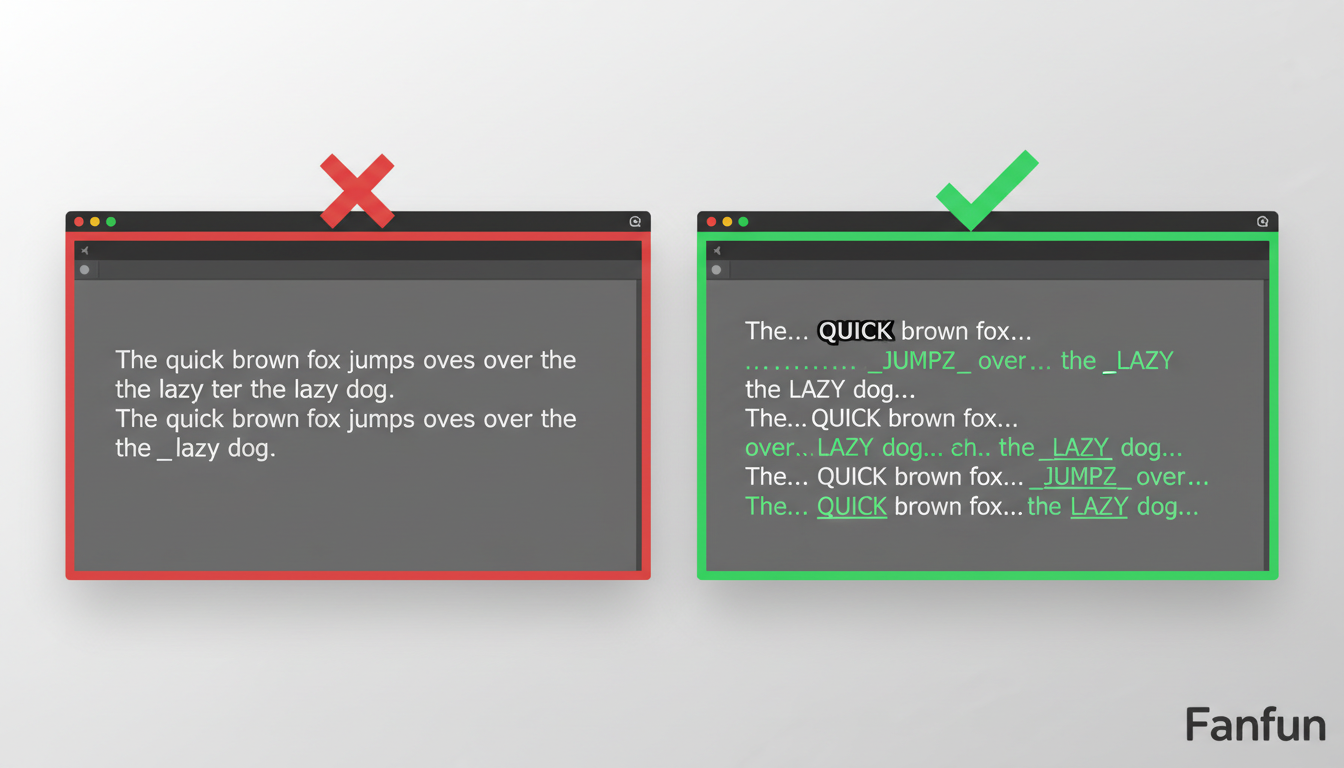
When you are optimizing your voiceover pacing for 60-second retention, remember that silence is just as important as sound. A well-placed pause is where the audience laughs. You can manipulate the AI's timing using specific punctuation hacks:
- Ellipses (...) for the Slow Burn: Use three dots to force the AI to pause and build anticipation before delivering a punchline. (e.g., "I spent three hours cleaning the kitchen... only for my roommate to make a single piece of toast.")
- Em-Dashes (—) for Sudden Cuts: Use an em-dash to create sharp, sudden interruptions or mid-sentence pivots. (e.g., "I'm totally on top of my life right now—wait, is that my car being towed?")
- Phonetic Spelling for Emotional Pitch: If a word needs to sound dragged out, spell it phonetically. Write "Whaaaat" instead of "What," or "Ughhhhh" instead of "Ugh" to force the AI to drag out the vowel sounds.
- Capitalization for Sudden Volume: Some advanced models interpret ALL CAPS as a cue to raise their pitch or add intensity, which is perfect for sudden comedic outbursts.
Designing the Persona: How Voice Architecture Shapes the Joke
A funny voiceover isn't just about the words on the page; it's about the perceived history of the character speaking. When you design or select a character voice, you are selecting a set of behavioral rules, vocabulary preferences, and emotional baselines. Understanding how to design an AI character for high-fidelity roleplay and voice generation will help you write scripts that feel incredibly natural for that specific persona.
For example, if you are using a nostalgic character voice, the humor comes from placing that character in a modern, highly relatable, or slightly inappropriate context. Imagine using a friendly, helpful anime companion voice to deliver a dry, corporate performance review. If you want to experiment with these dynamics, you can learn how to chat with Doraemon AI online for creative problem solving and nostalgic roleplay, using those interactive conversations to brainstorm unique script ideas and dialogue styles before you ever hit the record button.
The Audio Director's Playbook: Mixing, Pacing, and Exporting for Reels
Even the most perfectly scripted AI voiceover will fall flat if the final audio mix is muddy. When viewers scroll past your Reel, they should be hit with clean, crisp, studio-quality sound that separates your content from the sea of low-quality microphone recordings. This requires a disciplined approach to post-production.
By mastering how to mix, pace, and contextualize AI voiceovers, you ensure that your jokes are never drowned out by background music. Always apply "audio ducking" to your background tracks, dropping the music by 12 to 15 decibels whenever the AI voice is speaking. Additionally, time your visual cuts to align perfectly with the audio's natural pauses. If your AI character takes a dramatic beat, cut to a close-up of a confused face at that exact millisecond. This tight synchronization between audio and video is what makes a sketch feel professionally produced and incredibly satisfying to watch.
Fanfun streamlines this entire process, allowing you to generate high-fidelity character voices instantly, export them in high-quality formats, and drop them directly into your favorite editing app. By combining professional comedic writing techniques with Fanfun's powerful voice library, you can consistently produce Reels that stop the scroll, command attention, and drive massive engagement.
How do I make my AI voiceover sound less robotic on Instagram Reels?
Avoid long, grammatically perfect sentences. Break your text into shorter, punchy segments using punctuation like ellipses and em-dashes to force natural-sounding pauses and rhythm.
What is the best AI voice generator for funny social media videos?
The best tools allow for character-based archetypes rather than just generic tones. Fanfun is optimized for this, offering a range of personas that provide the personality necessary for comedic contrast.
Can I use character voices for commercial Instagram Reels?
Always verify the licensing within the platform you are using. Fanfun provides a library of personas specifically built for creative use cases, ensuring you can scale your content with confidence.
How do I add pauses and dramatic timing to an AI-generated voice?
Use ellipses (...) for short pauses and multiple line breaks or em-dashes (—) for longer, dramatic beats. Experimenting with phonetic spelling for emphasis also helps the AI model interpret your intended comedic delivery.