How to Write Dialogue for Character-Style Video Messages
Writing for synthetic character voices requires a different approach than standard text. Learn how to analyze a character's speech profile, format your script for clean AI generation, and structure an engaging 30-second message.

To write effective dialogue for character-style video messages, you must write for the ear rather than the page. This means capturing the character's unique sentence rhythms and formatting your text clearly so the AI voice generator processes it smoothly. While AI personas offer a highly customizable, playful alternative to real-person recordings, they are not perfect human replicas and rely entirely on the precise instructions you provide in your script. Keeping your script concise—typically within a 30-second window—is key to delivering a punchy, memorable message.
Deconstruct the Character's Speech Profile
Before typing your first line, study how your chosen character actually speaks. Every virtual persona has a distinct linguistic footprint made up of sentence length, vocabulary choices, and verbal habits. To replicate this authentically, break down their speech into three main elements:
- Sentence Length and Rhythm: Does the character speak in short, rapid-fire fragments, or do they lean into long, winding sentences? Matching this pacing is crucial for making the synthetic voice sound natural.
- Signature Phrases: Identify iconic catchphrases or conversational crutches. Use them sparingly to establish identity early on, but avoid overusing them to the point where the dialogue feels cluttered.
- Vocabulary and Tone: A cartoon character might use playful, exaggerated slang, while a historical figure or fantasy hero will use a more formal, elevated vocabulary. If you are tailoring a script for a specific genre, you can explore our detailed advice on how to write fantasy character dialogue for AI video messages.
Format Your Script for Clean AI Voice Generation
AI voice generators do not read text the way humans do. To help your script read smoothly, it is best to format your text with clarity in mind.
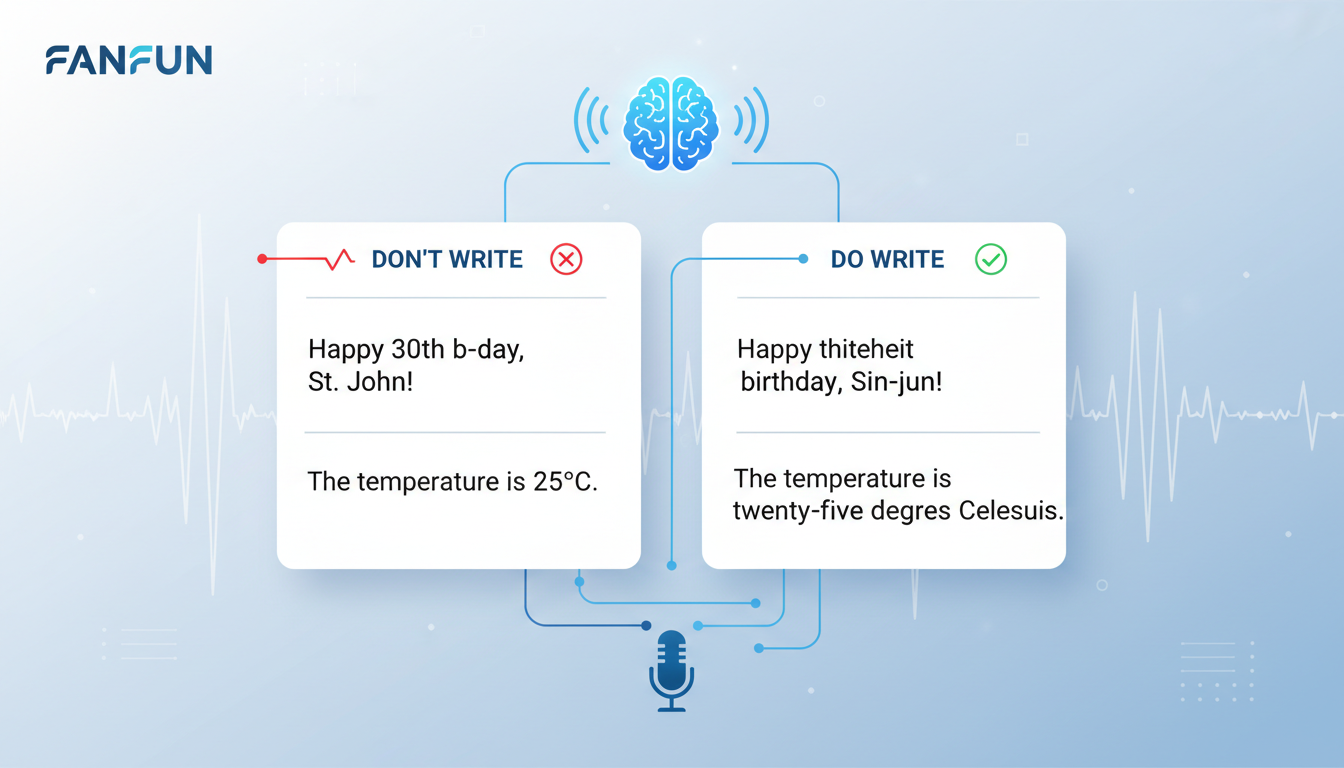
First, consider spelling out numbers, symbols, and abbreviations. Writing them out as full words, such as "ninety-nine" or "dollars," helps ensure the script is read exactly as you intend. Second, you can experiment with alternative spellings for unusual names, slang, or brand names if the initial generation doesn't sound quite right. Finally, keeping your punctuation simple with standard commas and periods is a reliable way to structure natural pauses and full stops.
Keep in mind that on Fanfun, one video credit covers up to 30 seconds of spoken dialogue. Keeping your script tight ensures you stay within this standard video limit while maintaining high audience retention.
| Standard Text (Avoid) | AI-Optimized Script (Use) |
|---|---|
| Happy 30th b-day, St. John! Here's to $100 more years! | Happy thirtieth birthday, Sin-jun! Here is to one hundred more years! |
| Congrats on the new job @ NASA! #killingit | Congrats on the new job at Nassa! You are killing it! |
| See you on Nov. 25th at 5 p.m. sharp... right? | See you on November twenty-fifth at five p.m. sharp. Right? |
Structure Your 30-Second Script Arc
A well-structured character message keeps the recipient engaged from the first second to the last. For a standard 30-second video message, follow this reliable three-part framework:
1. The Hook (0-5 seconds)
Grab the recipient's attention immediately. Start with a classic character-specific greeting, an iconic catchphrase, or a dramatic callout. This instantly establishes the persona and sets a playful tone.
2. The Personalization (5-25 seconds)
Deliver the core message of your video. Whether you are sending a birthday wish, a pep talk, or celebrating a major milestone, make it specific to the recipient. Use their name, mention a real hobby, or reference a shared inside joke. If you are celebrating a big achievement, you can use our pre-formatted virtual character congratulations prompts as a starting point.
3. The Sign-off (25-30 seconds)
End the video with a memorable, character-appropriate parting line. Keep the closing concise so the video ends on a high note. For seasonal messages, you can browse our holiday dialogue templates for custom AI character video greetings to find the perfect festive closing.
Test and Preview the Dialogue Before Generating
To avoid spending your video credits on a script that does not flow quite right, always test your dialogue beforehand. First, read your script aloud at a natural pace. If you stumble over a sequence of words, the AI voice generator likely will too. Simplify any tongue-twisters or awkward phrasing.
Next, take advantage of Fanfun's platform features. You can use Fanfun's free daily voice chat or short voice-note features to test-run tricky sentences with the actual AI voice generator before finalizing your video. Listen closely to the pacing, breath pauses, and emphasis. If a pause feels too short, add a comma or a period to give the synthetic voice a moment to breathe, ensuring the final video sounds exactly as you intended.
How do I make the AI voice generator pause longer between sentences?
To create a longer pause, try using standard punctuation like periods or commas, or split the text into shorter, separate sentences to naturally pace the dialogue.
Should I write out sound effects like laughs or sighs in the script?
It is generally best to avoid writing out sound effects like "haha" or "sigh" unless you want the AI to literally pronounce those words. Focus instead on writing expressive dialogue that naturally carries the intended emotion.
What should I do if the AI character mispronounces a recipient's name?
If a name doesn't sound right, you can try writing it out with alternative spellings that mimic its natural sound to see if it improves the pronunciation.