The Scriptwriter’s Promptbook: How to Write and Generate AI Character Dialogue That Actually Sounds Human
Most AI dialogue fails because creators treat AI like an author rather than an actor. Discover how to write vocal direction, build a unique dialogue DNA blueprint, and generate realistic character speech on Fanfun.
AI-generated text is everywhere, but it has a glaring, immersion-breaking problem: it sounds like it was written by an exceptionally polite corporate assistant. When you ask a standard generator to write a line for a battle-hardened warrior, a cynical detective, or a hyperactive cartoon sidekick, you often get grammatically flawless, completely lifeless exposition. The character says exactly what they are thinking, uses perfectly balanced compound sentences, and sounds indistinguishable from a search engine's help page.
The secret to realistic AI dialogue isn't finding a magic, one-word prompt; it's shifting your mindset from a passive writer to an active director. By treating AI voice and text tools like actors who need subtext, rhythm, and clear vocal constraints, you can generate speech that leaps off the screen. Whether you are creating custom memes, social media content, or personalized celebrity videos on Fanfun, this guide provides a repeatable framework for mapping a character's linguistic DNA, prompting for subtext, and directing the final performance.
The Illusion of Spontaneity: Why Standard AI Dialogue Sounds Flat
Default AI language models are built on a foundation of helpfulness, safety, and academic correctness. They are designed to explain complex topics, summarize documents, and maintain a polite, balanced tone. This is excellent for customer service or research, but it is the absolute death of creative writing. Real human dialogue is messy, asymmetrical, and highly inefficient. We rarely speak in complete, grammatically perfect sentences; instead, we rely on fragments, run-ons, and sudden shifts in direction.
When an AI writes a script, it naturally defaults to "on-the-nose" exposition. If a character is angry, the AI might have them say, "I am incredibly angry with you right now." In reality, an angry person might slam a door, use a sharp, single-word sentence, or employ dripping sarcasm. To break the default "Siri voice" mold, creators must actively inject human flaws, verbal crutches, and structural asymmetry into their scripts. You must force the AI to stop writing like an essayist and start writing like a human who is interrupted by their own thoughts, environment, and emotions.
The Character Voice Blueprint: Mapping Your Dialogue DNA
Before you type a single line of dialogue into a generator, you must define the character’s unique linguistic footprint. If you do not establish these boundaries, the AI will default to its average baseline. A character's voice is defined by more than just their catchphrases; it is built on their syntax, vocabulary tier, and emotional temperament. For a deeper dive into crafting the emotional core of your script, check out our guide on scripting an AI character message that feels genuinely alive.
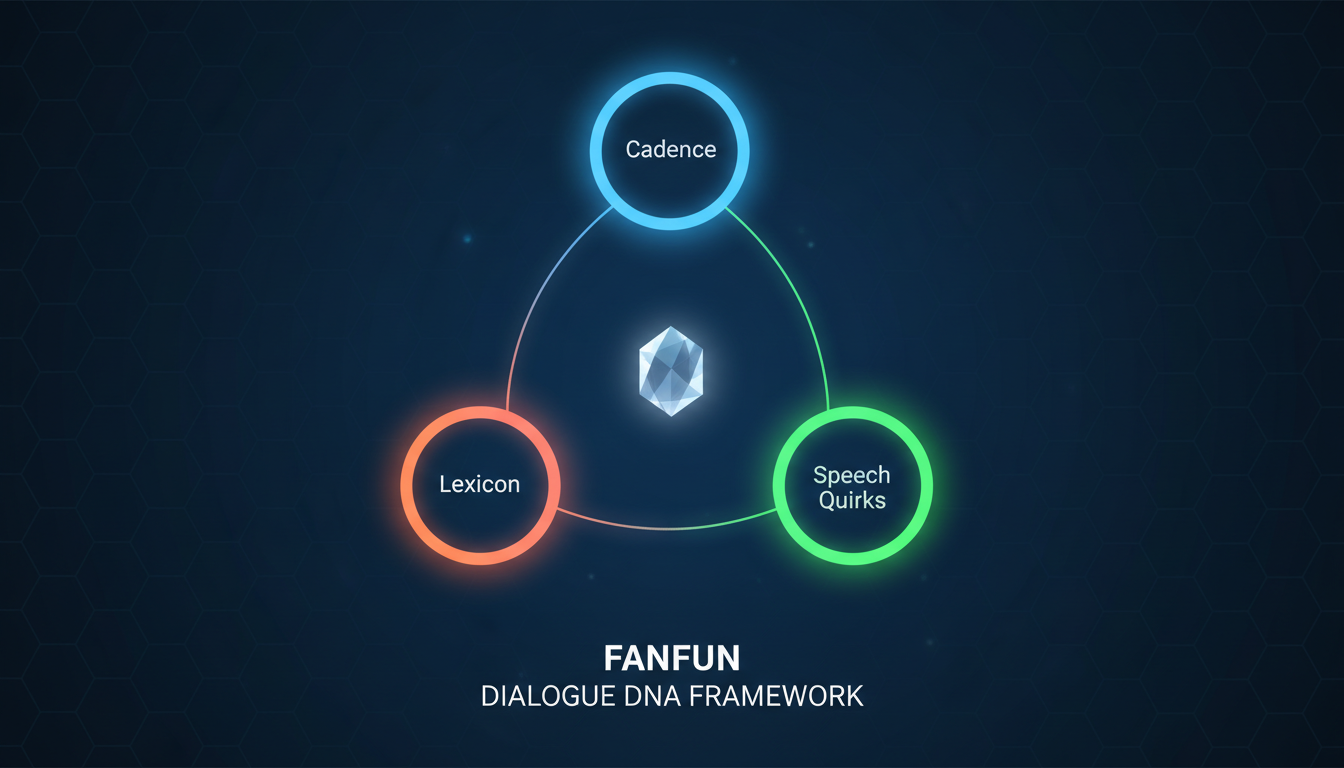
The Three Pillars of Dialogue DNA
To build a robust character profile, break their speech patterns down into three core pillars:
- Cadence: The rhythm and speed of their speech. Do they speak in rapid-fire bursts, or do they drag out their syllables with slow, deliberate pauses? Do they prefer short, punchy fragments or winding, poetic sentences?
- Lexicon: The vocabulary they use. A street-smart detective uses different slang, technical jargon, and sentence structures than an ancient, formal royal. Lexicon dictates whether a character says "my apologies," "my bad," or "sorry about that."
- Speech Quirks: The specific verbal tics, crutches, and habits that make a voice recognizable. This includes recurring transition words (like "Listen," "Look," or "Honestly"), stuttering over certain words, or trailing off when they get distracted.
By mapping these three pillars, you can create a highly specific linguistic profile. The table below illustrates how changing these parameters completely transforms the personality and tone of the exact same message:
| Character Archetype | Cadence | Lexicon | Speech Quirks | Example: "We need to leave now." |
|---|---|---|---|---|
| The Hyperactive Sidekick | Rapid, breathless, short sentences. | Informal, slang-heavy, enthusiastic. | Uses "like," "oh my gosh," and trails off. | "Oh my gosh, okay, so—we gotta go. Like, right now. Move, move, move!" |
| The Cynical Mentor | Slow, deliberate, uses heavy pauses. | Dry, sarcastic, minimalist. | Sighs, starts sentences with "Look," or "Kid..." | "Look... if you want to live to see tomorrow, I suggest you start moving. Now." |
| The Formal Royal | Flowing, complex, rhythmically balanced. | Archaic, elevated, highly polite. | Avoids contractions (e.g., uses "cannot" instead of "can't"). | "Our time here has expired. It is imperative that we depart immediately." |
Prompting for Subtext: Getting AI to Speak Between the Lines
The golden rule of screenwriting is that characters rarely say exactly what they mean. Subtext is the hidden current running beneath the surface of a conversation. If two characters are having a fight about who washed the dishes, they are usually actually fighting about respect, neglect, or power. Because AI models are designed to be literal, they struggle with subtext unless you explicitly prompt them to write it.
To force the AI to write layered dialogue, you must use emotional constraints and objective-based prompting. Instead of prompting, "Write a dialogue where a boss fires an employee," try: "Write a dialogue where a boss is firing their favorite employee. The boss must try to sound professional and cold, but their sentence structure should betray their guilt. They should avoid direct eye contact and focus on minor administrative details to distract from the emotional weight." By giving the AI a hidden motive, you force it to write lines that carry tension.
You can also use a "Show, Don't Tell" prompting template to guide the AI's creative process. For example:
"Write a script for [Character] reacting to a surprise party. Rule 1: They cannot say 'I am surprised' or 'Thank you.' Rule 2: They must focus on a physical reaction or a minor, irrelevant detail to deflect their embarrassment. Rule 3: Use short, fragmented sentences to show their initial shock before they regain their composure."
This structured constraint forces the generator to step away from cliché, on-the-nose responses and write dialogue that feels organic, unexpected, and deeply human.
From Text to Voice: Directing the Performance on Fanfun
Once you have written a script that sparkles with subtext and character-specific syntax, the next challenge is translating that text into a living, breathing vocal performance. This is where many creators stumble. An AI voice generator reads text literally; it does not automatically know where to take a breath, where to place dramatic emphasis, or when to lower its pitch. To get a stellar performance out of Fanfun's AI Voice Generator, you must write "vocal direction" directly into your script.

This formatting is especially critical when directing character-driven AI voiceovers for high-engagement platforms like Reels and TikTok. This formatting is especially critical when directing character-driven AI voiceovers for high-engagement platforms like Reels and TikTok. To guide the AI's pacing, use punctuation as a steering wheel. Ellipses (...) indicate a hesitant pause or a trailing thought. Dashes (—) signal a sudden interruption or a sharp shift in focus. Punctuation tells the AI's neural network to pause, breathe, or alter its pitch. For example, writing "No... wait. Don't do that." will yield a vastly different, more dramatic performance than "No, wait, don't do that." You can also spell words phonetically (like "gonna" instead of "going to," or "shuuut up" to force elongation) to break up the sterile, robotic pronunciation.
If you are building an interactive experience rather than a static video, you'll want to master the art of directing a celebrity chatbot with voice to handle dynamic, real-time fan responses. If you are building an interactive experience rather than a static video, you'll want to master the art of directing a celebrity chatbot with voice to handle dynamic, real-time fan responses. On Fanfun, matching the right script format to the right medium ensures that whether your audience is watching a custom meme video or chatting directly with their favorite character, the illusion of life remains completely unbroken.
The Dialogue Polish: Troubleshooting Common AI Speech Quirks
Even with advanced prompting, AI-generated drafts often require a final editorial pass to remove lingering robotic habits. AI models love certain words and structural patterns that real humans almost never use in casual conversation. To ensure your dialogue sounds natural, run your generated script through this quick-reference troubleshooting checklist:
- Eliminate "AI Buzzwords": Scan your script for words like *testament*, *delve*, *beacon*, *tapestry*, *foster*, or *crucial*. Real people rarely say, "This is a testament to our friendship" during a casual conversation. Replace them with simpler, punchier alternatives.
- The "Well..." Trap: AI generators love to start every single line of dialogue with a conversational filler word, most commonly "Well, ..." or "So, ...". Go through your script and delete 90% of these opening fillers. The dialogue will instantly feel faster and more assertive.
- The Read-Aloud Test: Read the dialogue out loud at normal speaking speed. If you find yourself running out of breath, or if your tongue trips over a sequence of words, the sentence is too long or complex. Break compound sentences into two shorter sentences.
- Cut by 20%: Real speech is highly efficient and minimalist. Take your draft script and aggressively cut out 20% of the words. Focus on removing unnecessary explanations and redundant adjectives. Let the voice actor's delivery—or the AI's vocal tone—do the heavy lifting.
By balancing consistency with surprise, you ensure that your character stays highly recognizable without turning into a predictable caricature. Writing for AI isn't about letting the machine do all the work; it's about setting up the perfect parameters, guiding the performance, and polishing the output until the line between human and machine completely disappears.
How do you make AI-generated dialogue sound less robotic?
To make AI-generated dialogue sound human, you must break its default habit of being grammatically perfect and overly polite. Inject human flaws like sentence fragments, verbal crutches (such as 'like' or 'look'), and varying cadences. Most importantly, prompt the AI to write with subtext rather than having characters state their feelings directly.
What is the best way to prompt AI to write in a specific character's voice?
The best way is to map out the character's Dialogue DNA: their Cadence (rhythm and speed), Lexicon (vocabulary tier and slang), and Speech Quirks (verbal tics or catchphrases). Include these parameters explicitly as constraints in your prompt, and provide concrete examples of how they speak.
How do punctuation and spelling affect AI voice generation output?
Punctuation acts as vocal direction. Ellipses (...) force pauses and hesitant pacing, dashes (—) trigger sudden shifts or interruptions, and exclamation points raise the pitch. Phonetic spelling (like writing 'gonna' or elongating vowels like 'nooo') can also force the AI to bypass sterile, textbook pronunciations.
Can I use AI to generate natural-sounding dialogue for fan-fiction or memes?
Absolutely. Platforms like Fanfun allow you to generate authentic-sounding character dialogues, roasts, memes, and stories by combining tailored script templates with specialized AI voices that mimic the tone, cadence, and personality of popular fictional icons.