
How to Structure a 60-Second Character Video Script
Writing a 60-second AI character script requires a smart pacing strategy. Learn how to break your minute into four distinct quarters to keep your message engaging, clear, and perfectly timed.

To structure a 60-second character video script, you should aim for a word count of 130 to 150 words and divide your message into four distinct 15-second segments. This pacing keeps the narrative moving while leaving plenty of room for an AI voice generator to pause, breathe, and deliver natural character inflections without sounding rushed.
The 60-Second Script Blueprint & Editable Template
Before diving into the pacing details, here is a highly versatile, editable template designed to fit exactly within a 60-second timeframe. You can adapt this structure for birthdays, congratulations, or lighthearted roasts.
[0:00-0:15 - The Hook]
"Well, look who finally decided to show up! It's your favorite [Character Name] here, coming to you live from [Character's Iconic Setting]!"
[0:15-0:30 - The Connection]
"I heard from [Sender's Name] that it's a pretty big day for you, [Recipient's Name]. Yes, I’m talking about your [Occasion, e.g., 30th birthday]!"
[0:30-0:45 - The Core Message]
"Now, [Recipient's Name], we all know you're getting a bit up there in years, but don't worry—just like my favorite [Character Reference/Joke], you're only getting better with age. Or at least, that's what we tell ourselves!"
[0:45-1:00 - The Outro]
"Keep shining, keep doing your thing, and remember to [Character Catchphrase]! Catch you on the flip side!"
Script Preparation Checklist
- Word Count: Keep it between 130 and 150 words.
- Pacing: Read the script aloud slowly, pausing where the character would naturally pause.
- Focus: Stick to one central theme or joke rather than trying to cover multiple topics.
The Golden Rules of a 60-Second AI Character Script
A one-minute video is the sweet spot for a personalized greeting. It gives you enough time to build a fun narrative setup without losing the recipient's attention. However, writing for an AI voice generator requires a slightly different approach than writing for a live actor. AI voices need space to breathe, and crowding too many words into a single minute will result in a rushed, unnatural delivery.
When creating a custom video message on Fanfun, keep in mind how the platform's system works. One video credit covers up to 30 seconds of speech. This means a 60-second script will utilize two video credits. If your message is simple and direct, you might want to consider writing a perfect 30-second script to save credits. But if you want to deliver a fully realized joke, a brief story, or a playful roast, the 60-second format is ideal.
| Feature | 30-Second Script | 60-Second Script |
|---|---|---|
| Ideal Word Count | 65 - 75 words | 130 - 150 words |
| Credit Cost | 1 Credit | 2 Credits |
| Best For | Quick shoutouts, simple greetings | Roasts, short stories, detailed jokes |
The 4-Quarter Pacing Blueprint
To keep your video engaging from the first frame to the last, split your 60 seconds into four distinct blocks. If you want to explore more layout options for shorter projects, you can check out our foundational advice on structuring short virtual character scripts. For a full minute, use this balanced breakdown:
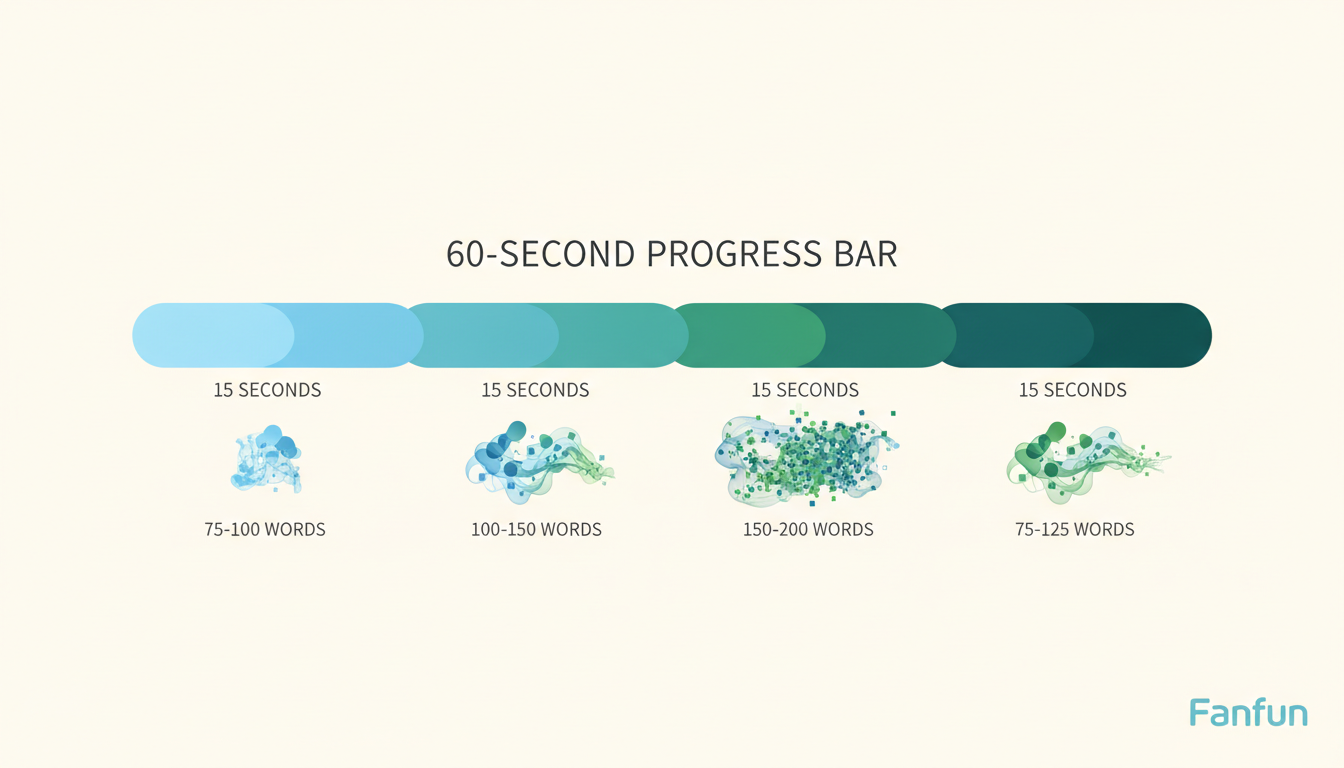
1. Seconds 0-15: The Hook & Character Intro
Establish the character's unique voice immediately. Start with an iconic catchphrase, a signature greeting, or an in-character remark about where they are. This immediately lets the recipient know who is talking and sets a playful tone.
2. Seconds 15-30: The Personal Connection
This is where you make the video special. Introduce the recipient's name, mention who sent the video, and state the specific occasion. Keep this transition smooth and conversational.
3. Seconds 30-45: The Meat of the Message
Deliver the core joke, story, or piece of advice. Whether it is a gentle tease about their age or a reference to an inside joke, this 15-second block is the emotional or comedic heart of your video message.
4. Seconds 45-60: The Outro & Call to Action
Wrap up the message with a warm sign-off. End with a classic character-appropriate parting line or catchphrase that leaves the recipient smiling as the video ends.
A Worked Example: The Milestone Birthday Roast
To see how this pacing works in action, let's look at a completed 140-word script designed for a humorous birthday message. If you want to learn more about crafting comedic timing for your videos, make sure to read our guide on humorous virtual character script writing.
Here is how a finished script looks when filled out for a fictional character roast:
"Oh, boy! Look who finally decided to roll out of bed! It's your favorite lazy star, Patrick, coming to you live from under my very comfortable rock! I heard from your buddy Mark that it's a pretty big day for you, Sarah. Yes, I’m talking about your thirtieth birthday! Now, Sarah, we all know you're getting a bit up there in years, but don't worry—just like my favorite jar of pickles, you're only getting better with age. Or at least, that's what Mark told me to say! Keep shining, keep doing your thing, and remember to always eat your ice cream before it melts! Catch you on the flip side, buddy!"
This worked example uses short, punchy sentences. By avoiding complex, winding clauses, you give the AI generator the best chance to hit the comedic beats naturally. Simply swap out the bracketed details in our template, keep your word count in check, and you're ready to create a memorable, personalized video on Fanfun.
How many words is a 60-second script?
For an AI-generated character video, a 60-second script should ideally be between 130 and 150 words. This word count ensures the voice model can speak at a natural pace, complete with appropriate pauses and character inflections.
Can I use sound effects or pauses in my 60-second script?
While you cannot write sound cues directly into the script, keeping your sentences short and using standard punctuation helps structure the text clearly. Reading your script aloud beforehand is a great way to ensure the pacing feels natural and unhurried.
What happens if my script runs slightly over 60 seconds?
On Fanfun, video generation is calculated based on speech length. One video credit covers up to 30 seconds of speech. If your script runs slightly over 60 seconds, it will simply use an additional credit to cover the extra time. You will see an estimate of the required credits before generating your video.



