How to Write a Pet Adoption Congratulations Script for a Virtual Character Video
Welcoming a new dog or cat home is a massive milestone. Skip the standard greeting card and send a customized, highly entertaining virtual character video message instead.

Celebrating a new pet adoption with a virtual character video is a fantastic way to match the chaotic, joyful energy of bringing home a rescue animal. To make your message land perfectly, keep your script under 30 seconds (roughly 60 to 75 words) and tailor the delivery to the pet's specific quirks, such as endless zoomies or a love for napping. While AI voice generators offer an incredibly fun, personalized alternative to static cards, remember that they won't perfectly replicate human nuances every time, so keeping your phrasing clear and simple is the key to a great result.
Why a Virtual Character Video is Perfect for Pet Adoptions
Bringing a new pet home is a major life milestone, yet traditional congratulations cards often feel a bit too formal for the occasion. A virtual video message brings a playful, lighthearted energy that matches the excitement of welcoming a new four-legged family member.
With a platform like Fanfun, you can choose from 60 AI characters—ranging from beloved animated personalities to playful parodies—to deliver your custom message directly to the new pet parent's inbox. Because you are matching a virtual character to a real pet's personality, you can lean into the humor of pet parenthood. To keep the message engaging and prevent the AI voice generator from losing steam, you will want to keep the script concise. Learn how to structure your message within strict time limits in our guide to writing a perfect 30-second virtual character script.
The Fill-in-the-Blank Pet Adoption Script Template
This editable template is designed to fit comfortably within a single 30-second video credit. It balances warm congratulations with a nod to the adorable chaos of a new pet.
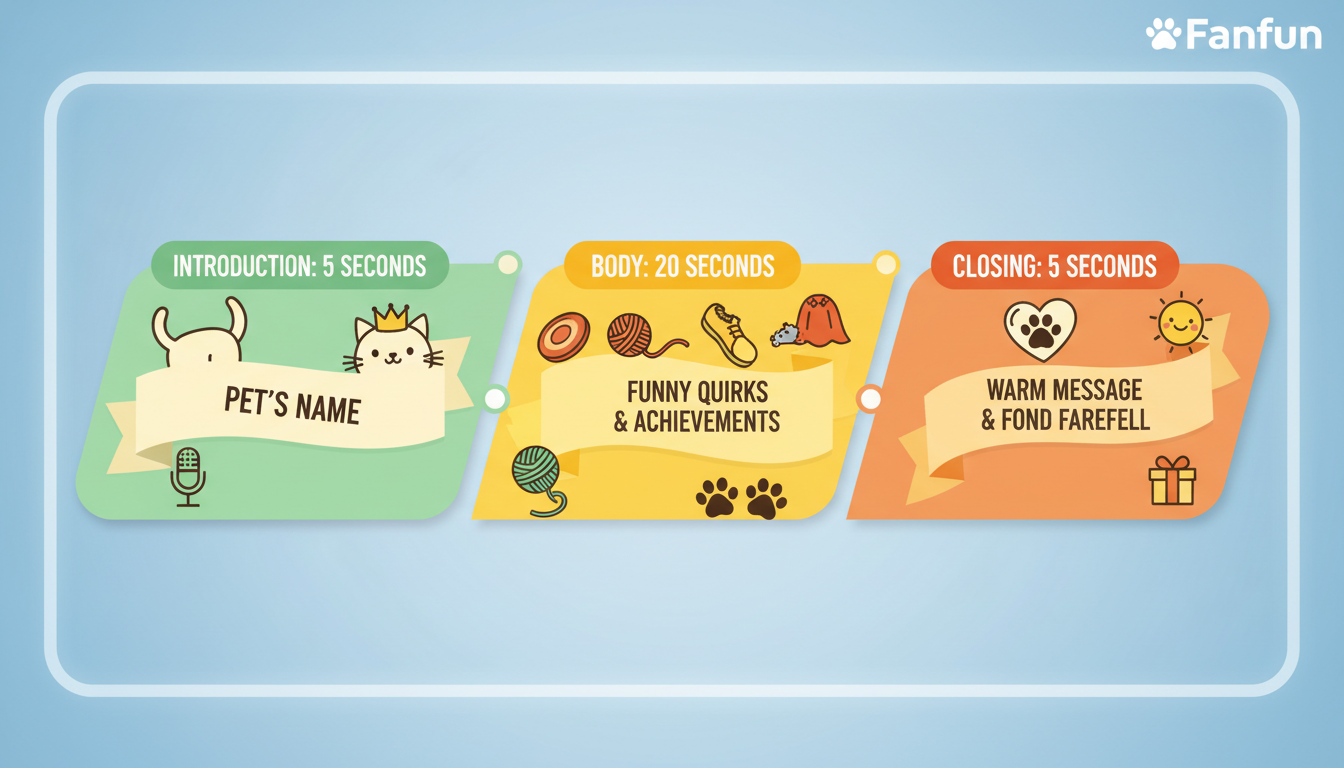
The "New Fur Baby" Template (approx. 65 words):
"Hey [Adopter Name]! Word on the street is you just adopted [Pet Name]! Huge congratulations on becoming the official pet parent to this beautiful [Dog/Cat/Animal]. I already hear reports of [Funny Quirk 1] and endless [Funny Quirk 2]. Get ready for a lifetime of unconditional love, chewed-up shoes, and zero personal space. You two are going to be best friends. Enjoy the journey!"
When filling out this template, write out any complex or unusual pet names phonetically so the AI voice generator reads them naturally. For example, if the dog's name is "Phideaux," write it as "Fido" in your final script submission to avoid awkward pronunciation pauses.
Worked Example: The 'Welcome Home, Buster' Script
Here is an illustrative example of how the template looks once it is fully customized for a high-energy, newly adopted puppy named Buster. This script is tailored for an enthusiastic, fast-talking character style.
Completed Example:
"Hey Sarah! Word on the street is you just adopted Buster! Huge congratulations on becoming the official pet parent to this beautiful golden pup. I already hear reports of stolen slippers and endless midnight zoomies. Get ready for a lifetime of unconditional love, chewed-up shoes, and absolutely zero personal space. You two are going to be best friends. Enjoy the journey!"
Notice how specific details like "stolen slippers" and "midnight zoomies" replace the generic placeholders. These small touches make the video feel incredibly personal, even when delivered by a fictional character persona.
Character Matching Checklist: Pairing the Voice to the Pet
To make the video message feel cohesive, match the archetype of the virtual character to the known personality of the new pet. Below is a quick decision guide to help you choose the right style on Fanfun:
| Pet Personality / Breed | Recommended Character Style | Script Tone Focus |
|---|---|---|
| Hyperactive Puppy / Playful Dog | Energetic Animated Character | Excited, fast-paced, loud congratulations |
| Sassy, Independent Cat | Sarcastic or Deadpan Persona | Humorous warnings about who really owns the house |
| Regal, Dignified Older Rescue | Sophisticated or Dramatic Voice | Grand, cinematic welcome-home speech |
For more tips on making your character's delivery funny and engaging, check out our guide on humorous virtual character script writing. If you want to lean entirely into a grand, epic theme for a noble-looking rescue dog, you can also draw inspiration from our guide to writing a medieval knight congratulations script for a virtual character video. Whichever direction you choose, keeping the script lighthearted and tailored to the pet’s quirks ensures a memorable gift the new owner will want to replay and share.
How do I make sure the AI character pronounces my pet's unique name correctly?
The best way to ensure correct pronunciation is to spell the name phonetically in your script. For example, if the pet's name is "Benoit," write it as "Ben-wah" in the script box. This helps the AI voice generator read the name naturally without tripping over unusual spelling patterns.
How long can my virtual character video message be?
A single video credit covers up to 30 seconds of speech. If you want to write a longer script, you can do so, and it will use more credits. You will see the estimated credit cost before you generate your video.
What is the best virtual character style for a rescue cat versus a rescue dog?
For rescue cats, a sarcastic, deadpan, or slightly dramatic character style works beautifully to highlight a cat's independent nature. For rescue dogs, go with high-energy, enthusiastic, or heroic character styles to match their excited, loyal, and energetic personalities.