
How to Roleplay with AI Characters Online: A Creative Writer's Guide
Want to elevate your creative writing? Discover how to establish immersive roleplay sandboxes, keep AI characters in persona, and script playful character video messages.

To roleplay with AI characters online effectively, treat the interaction as a collaborative improv session rather than a passive chat. Successful AI roleplay requires setting clear character parameters, using descriptive action tags to separate physical cues from dialogue, and applying the "Yes, And" rule of theatrical improv to build on the AI's responses. While virtual characters provide a highly responsive canvas for creative writing, maintaining narrative control prevents the AI from drifting out of character or slipping into repetitive loops.
Set the Stage: Establishing Your Roleplay Sandbox
Before you type your first line of dialogue, you need to establish the rules of your narrative sandbox. AI models rely on initial context to determine their tone, vocabulary, and boundary limits. If you skip this setup, the character is likely to drift into generic, overly polite assistant behaviors. To build a robust foundation, start by mastering how to chat with virtual characters for creative roleplay.
A successful roleplay setup requires three main ingredients:
- Core Traits and Voice: Define the character's vocabulary, emotional baseline, and background. For instance, does your character speak in short, clipped sentences, or are they prone to dramatic monologues?
- The Immediate Conflict: Give the scene immediate stakes. Instead of starting with "Hello," place your characters in a specific situation, like standing outside a locked door or hiding from a storm.
- System Prompts: Use the platform's system instructions or pinned messages to lock in the character's perspective, ensuring they do not break character as the conversation grows longer.
The Improv Method: Keeping the Scene Dynamic
Once your sandbox is ready, the key to maintaining momentum is treating the session like live improv theater. The cardinal rule of improv is "Yes, And"—accepting whatever premise your partner (the AI) introduces and adding something new to it. If the AI decides it is raining, do not ignore it; react to the wet ground or grab an umbrella.
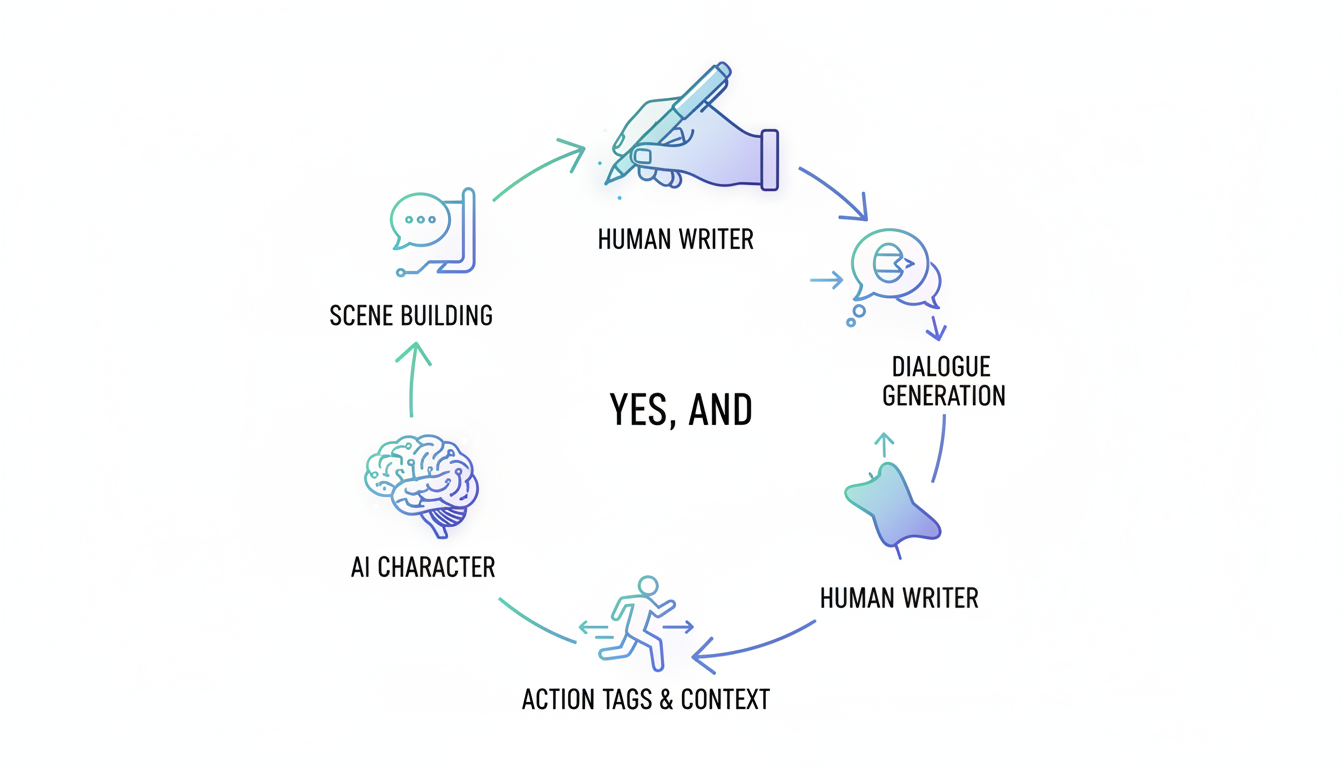
To keep the narrative clean and readable, use descriptive action tags. Placing physical actions, internal thoughts, or environmental changes inside asterisks or brackets helps separate spoken dialogue from narrative direction. For a deeper dive into structuring these interactions visually, check out our screenplay method guide.
The table below highlights the difference between passive chatting and active, improv-style roleplaying:
| Interactive Approach | Passive Chatting (Avoid) | Improv Roleplay (Preferred) |
|---|---|---|
| Narrative Control | Letting the AI drive every plot point. | Guiding the direction with active choices. |
| Dialogue Style | Repetitive, question-and-answer formats. | Dynamic exchanges with action cues. |
| Scene Building | Ignoring physical surroundings. | Using brackets to describe the environment. |
If the AI starts to drift or misinterpret your prompt, do not break character to complain. Instead, gently steer the trajectory by editing its last response, or use narrative cues within your next turn to correct the course.
From Text to Video: Bringing Your Characters to Life
Once you have built a compelling narrative arc, you can explore co-writing stories with AI chat characters to flesh out full-length scenes. But you do not have to limit your creations to the written page.
At Fanfun, we see text roleplay as a fantastic way to spark your imagination. If your roleplay sessions inspire a fun idea, you can bring a similar character concept to life in a different format. On Fanfun, you can pick a favorite character and tell them exactly what to say—whether it's a quick roast, a birthday greeting, or a dramatic monologue. It is a playful creative sandbox designed to help you preview and share character-style video messages with friends, rather than a tool for importing previous chat logs. Just remember that these are playful, character-style video messages, not real-person recordings or perfect voice clones.
How do I stop an AI character from repeating the same phrases?
If your AI partner gets stuck in a repetitive loop, edit their most recent message to remove the repeated phrase, or introduce a sudden shift in the scene (like a loud noise or a new character entering) to force a change in vocabulary.
Can I roleplay with multiple AI characters at the same time?
Yes. You can either use platforms that support group chats with multiple AI personas, or act as the narrator yourself, introducing other characters in brackets and directing the primary AI on how to interact with them.
What is the best way to handle time skips in an AI roleplay session?
Use clear, bolded narrative transitions in your prompt. For example, write "[Three hours later, inside the library...]" to establish the new setting and time frame clearly before resuming dialogue.



