
Beyond the Monotone: How to Choose and Direct Digital Voiceover Tools for High-Retention Video Edits
Standard text-to-speech ruins video retention. Discover the art of digital voice casting, phonetic script-tuning, and pro sound mixing to turn synthetic voices into cinematic narrators.
You have less than three seconds to convince a viewer not to swipe away from your video. While creators spend hours color-grading footage, refining jump cuts, and designing flashy thumbnails, they often treat the voiceover as an afterthought. Slapping a default, robotic text-to-speech (TTS) track over your edit is the fastest way to trigger a mute or scroll reflex on platforms like TikTok, Instagram Reels, and YouTube Shorts. The human ear is incredibly sensitive to auditory fatigue, and a flat, lifeless voice instantly signals low-effort content.
To compete in modern feeds, independent creators must shift from treating digital voiceover as a simple utility to treating it as an art form. By adopting the mindset of a digital casting director—pairing the right vocal archetype with smart script formatting and atmospheric sound design—you can match the production value of a major studio on a bootstrap budget. Let’s look at how to move past the monotone and master digital voice direction to keep your audience hooked from the first frame to the last.
The Creator's Dilemma: Finding a Voice That Stops the Scroll
Audiences are hyper-sensitive to audio quality. A slightly soft visual or a simple transition can easily be forgiven, but grating, synthetic audio immediately breaks immersion. The standard, default digital voices built into social media apps have been overused to the point of exhaustion. They lack rhythm, fail to emphasize key punchlines, and carry a clinical flatness that completely disconnects the viewer from the emotional beat of the video. When every third video on a user's feed features the exact same robotic narrator, your content instantly blends into the background noise.
High-retention editing requires an active vocal performance, not passive narration. The voice must match the visual pacing of your timeline. A high-energy meme edit needs rapid-fire delivery with dramatic pitch shifts, while a documentary-style video essay demands a measured, authoritative cadence that commands respect. If the vocal delivery doesn't match the visual energy, your retention metrics will suffer. Learn more about structuring your audio pacing in our comprehensive YouTube AI voiceover directing playbook.
The Digital Voiceover Spectrum: From Utility TTS to Character-Driven Performance
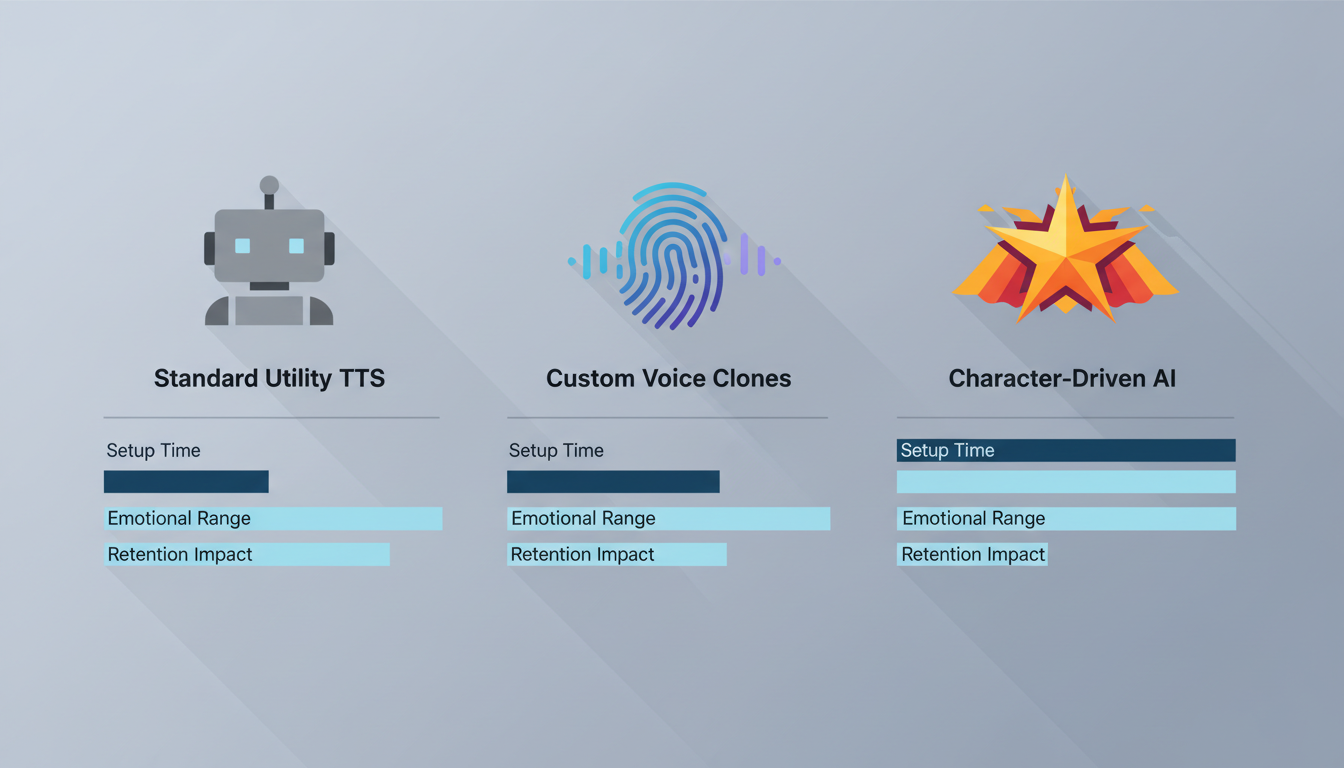
Not all digital voices are created equal. To choose the right toolchain for your creative workflow, you need to understand the three distinct tiers of voiceover technology available to creators today:
- Standard Utility TTS: These are the classic, robotic voices built into operating systems and basic editing apps. They are highly accessible and fast but offer virtually zero emotional range, nuance, or stylistic flexibility. They are best reserved for quick utility tasks, basic accessibility features, or simple reference tracks rather than narrative-driven content.
- Custom Voice Cloning: This technology allows you to clone your own voice or a hired actor's voice from a clean audio sample. While highly personalized, it requires a pristine recording setup to avoid synthetic artifacts, and the resulting models can still sound flat if the original recording lacked dynamic range and emotional variation.
- Character-Driven AI Voice Generators: This tier bridges the gap between utility and creative storytelling. Platforms like Fanfun offer instant access to highly expressive, culturally relevant character voices. Instead of sounding like a corporate assistant reading a spreadsheet, these tools provide distinct vocal personalities—from iconic animated archetypes to sports-style commentators—giving creators the ability to instantly match the specific vibe of their target audience.
Comparing Digital Voiceover Options for Creators
To help you determine which tool fits your production pipeline, we have broken down the primary digital voice categories across key performance metrics:
| Voice Category | Setup Time | Emotional Expressiveness | Best Video Format | Licensing & Safety |
|---|---|---|---|---|
| Standard TTS | Instant | Very Low (Monotone) | Quick tutorials, basic accessibility | Safe, built-in |
| Custom Voice Cloning | Hours to Days (Requires training data) | Medium to High (Depends on source quality) | Long-form video essays, personal vlogs | Requires explicit consent/rights |
| Character-Driven AI (e.g., Fanfun) | Minutes | High (Built-in personality & inflection) | Memes, social promos, fan dubs, roasts | Platform-approved, safe for creator use |
When analyzing speed-to-market, creators often face a choice between traditional talent booking platforms and instant generation. Our analysis of the Cameo vs. AI video showdown highlights how instant AI assets solve the bottleneck of talent availability, allowing you to react to trending memes in minutes rather than waiting days for a custom recording. This rapid turnaround is essential for staying relevant on fast-moving social algorithms.
Directing the Machine: Scripting and Phonetic Tweaks for Natural Delivery
Even the most advanced digital voice generator will struggle if you feed it raw, unpolished text. To get a human-like performance, you must write specifically for synthetic speech models. This process is less about standard grammar and more about phonetic directing. You are not just writing a script; you are designing a vocal performance.
Punctuation as Performance Direction
Digital voice engines interpret punctuation marks as performance cues. If your voiceover sounds rushed, robotic, or lacks dramatic tension, use punctuation to force natural pauses and shifts in emphasis:
- Ellipses (...): Use these to create a slow, trailing pause. This is ideal for building suspense before a major reveal or letting a joke land.
- Em-Dashes (—): Perfect for forcing a sudden, sharp break in thought, mimicking natural conversational flow and self-correction.
- Phonetic Spelling: If the engine mispronounces a brand name, slang term, or technical word, spell it out phonetically. For example, write "GIF" as "jif" or "ghif" depending on your preference, or write "bureaucracy" as "byoo-rock-ruh-see" to force correct syllable emphasis. If a word like "hyperbole" comes out flat, try writing it as "hy-per-bo-lee" to guide the engine's pitch.
Writing for the Breath
Human beings have to breathe. Synthetic voices do not, which often leads to long, run-on sentences delivered with impossible lung capacity. This is a subtle trigger that immediately signals to the viewer's brain that the voice is fake. Keep your sentences short, punchy, and rhythmic. If a sentence is longer than fifteen words, break it in half. For a deeper dive into coaxing nuanced performances out of synthetic actors, check out our guide on how to direct text-to-speech tools for character-driven storytelling.
The Rise of Character-Driven Video Formats
Modern audiences crave entertainment that feels personalized, interactive, and culturally self-aware. Creators are no longer limited to dry, third-person narration; instead, they are using highly recognizable vocal archetypes to build immersive worlds and engaging social formats. By using an expressive AI character video generator, you can cast distinct personas that instantly hook specific fandoms, turning a basic script into a highly shareable piece of pop-culture media.
For instance, if you are producing a celebratory video for a friend or community member, you can structure the script like a classic comedy dais. Rather than a standard greeting, you can craft a hilarious, fast-paced roast using iconic voices. Learn more about setting up this format in our guide to organizing a high-impact digital roast for a friend’s milestone. This level of customization transforms a generic video into an unforgettable digital keepsake.
Layering and Sound Design: Making Digital Voices Sound Cinematic
A digital voiceover should never sit dryly on top of your video track. Without environmental context, the voice sounds detached, floating awkwardly above the visuals like a corporate training video. Professional sound design is the secret weapon that masks digital artifacts, softens synthetic transitions, and blends your voiceover track seamlessly into your scene.
The first step is the "Room Tone" trick. In the real world, there is no such thing as absolute silence. To make a digital voice sound like it was recorded in a physical space, add a very low-volume track of ambient room tone, light room hiss, or outdoor wind rustle underneath your entire project. This continuous bed of low-frequency sound fills the digital gaps between spoken words, making the transitions sound incredibly natural.
Additionally, apply gentle audio ducking. Your background music should automatically drop by 3 to 5 decibels whenever the voiceover track is active. When mixing, apply a subtle high-pass filter to cut out muddy frequencies below 80Hz, and add a touch of spatial reverb if your visual setting is a large room, an office, or an outdoor space. Discover advanced mixing techniques in our guide on how to design custom character audio tracks for high-impact video edits.
The Ethics and Legality of Digital Voice Casting
As digital voice tools become more powerful and accessible, creators must navigate the ethical and legal landscape of synthetic audio. Scraping voice data from actors without their consent to create unauthorized clones is a recipe for copyright claims, platform demonetization, and legal disputes. Respecting intellectual property and creative ethics is essential for building a sustainable, long-term content creation career.
This is why using platforms like Fanfun is a game-changer for independent creators, marketers, and gift-givers alike. Fanfun provides a curated, approved library of highly expressive character voices. This ensures you can access the exact energy, tone, and cultural relevance you need for your memes, roasts, or video promos without worrying about copyright strikes, ethical gray areas, or platform bans. When publishing your content, maintaining transparency with your audience about your creative tools builds long-term trust and keeps you aligned with evolving platform disclosure policies.
How do I make digital voiceovers sound less robotic?
To reduce the robotic quality of digital voiceovers, write shorter sentences that mimic natural human breathing patterns. Use creative punctuation like ellipses (...) for suspenseful pauses and em-dashes (—) for abrupt transitions. Additionally, spell difficult or unusual words phonetically to guide the generator's pronunciation, and always layer a subtle background room tone under your audio mix to blend the voice into the environment.
Can I use AI voice generators for monetized YouTube videos?
Yes, you can use AI voice generators for monetized YouTube videos, provided you have the legal right to use the voice model and the content complies with YouTube's quality guidelines. YouTube generally permits synthetic voices as long as the content itself is original, transformative, and highly engaging. Avoid low-effort, mass-produced text-to-speech videos with static images, as these can be flagged as repetitive content.
What is the difference between text-to-speech and voice cloning?
Standard text-to-speech (TTS) converts written text into spoken audio using pre-built, generic voice models. Voice cloning, on the other hand, uses machine learning to analyze a specific individual's voice recordings and create a custom synthetic model that replicates their exact vocal quality, accent, and speech patterns.
How do creators get specific character voices for memes and video edits legally?
To legally use unique and recognizable character voices, creators should avoid unauthorized voice scraping tools. Instead, use platforms like Fanfun, which offer approved, high-quality character-driven AI voice and video generators. This allows you to create highly engaging, culturally relevant content safely and instantly without the risk of copyright strikes.



