
The Voice Director's Dub Room: How to Get True Dramatic Performance from Anime Character TTS Online
Stop settling for flat, robotic AI voiceovers. Learn how to use advanced punctuation, phonetic spelling, and character-first platforms to coax authentic Shonen energy and intimate dramatic delivery out of online anime TTS engines.
If you have ever tried using standard online text-to-speech (TTS) tools to voice an anime edit or fan dub, you have likely run into a frustrating wall. Instead of a soaring battle cry or a tense, whispered confession, you get a flat, robotic reading that sounds more like a GPS navigation system than a legendary hero. Standard TTS engines are calibrated for corporate training videos and audiobooks, leaving them completely unequipped for the theatrical, high-stakes world of Japanese animation.
To bridge this gap, creators must stop treating AI voiceovers as a simple copy-paste utility and start acting like voice directors. By leveraging character-first platforms like Fanfun and mastering the art of phonetic prompting, you can transform sterile text into dramatic, emotionally charged voice acting. Here is how to take control of the digital dubbing booth and coax true cinematic performances out of online anime voice generators.
The 'Uncanny Valley' of Anime TTS: Why Standard Voice Engines Fail the Dub Test
Traditional text-to-speech engines are engineered for neutrality, clarity, and consistency. They are designed to deliver information without distracting the listener. In the context of anime, however, neutrality is the enemy. Anime voice acting (or seiyuu work) is defined by its lack of neutrality—it relies on extreme vocal ranges, sudden pitch shifts, dramatic gasps, and highly stylized cadences that mirror the exaggerated visual style of the medium.
When you feed a dramatic line into a generic corporate TTS engine, the algorithm attempts to smooth out the emotional peaks and valleys. It flattens the breathy hesitation before a betrayal, ignores the rising pitch of a battle-weary warrior, and delivers a punchline with the same cadence as a quarterly earnings report. This challenge isn't unique to anime; learning how to direct an AI voice generator for video game characters requires a similar focus on emotional range and subtext.
To overcome this, creators need to work with models trained specifically on character performance. Fanfun's AI Voice Generator bridges this gap by utilizing models that preserve the dramatic flair, cadence, and iconic energy of classic character archetypes. Instead of starting with a sterile corporate baseline, these models are built from the ground up to understand that a dramatic pause is just as important as the spoken word.
The Archetype Blueprint: Matching Your Script to the Right Vocal Profile
Before you type a single word into an AI generator, you must identify the vocal archetype of your character. Feeding a hot-blooded battle monologue into a voice profile designed for a cool, aloof anti-hero will result in a jarring, out-of-character delivery. Matching your script's tone to the correct vocal archetype prevents this friction.
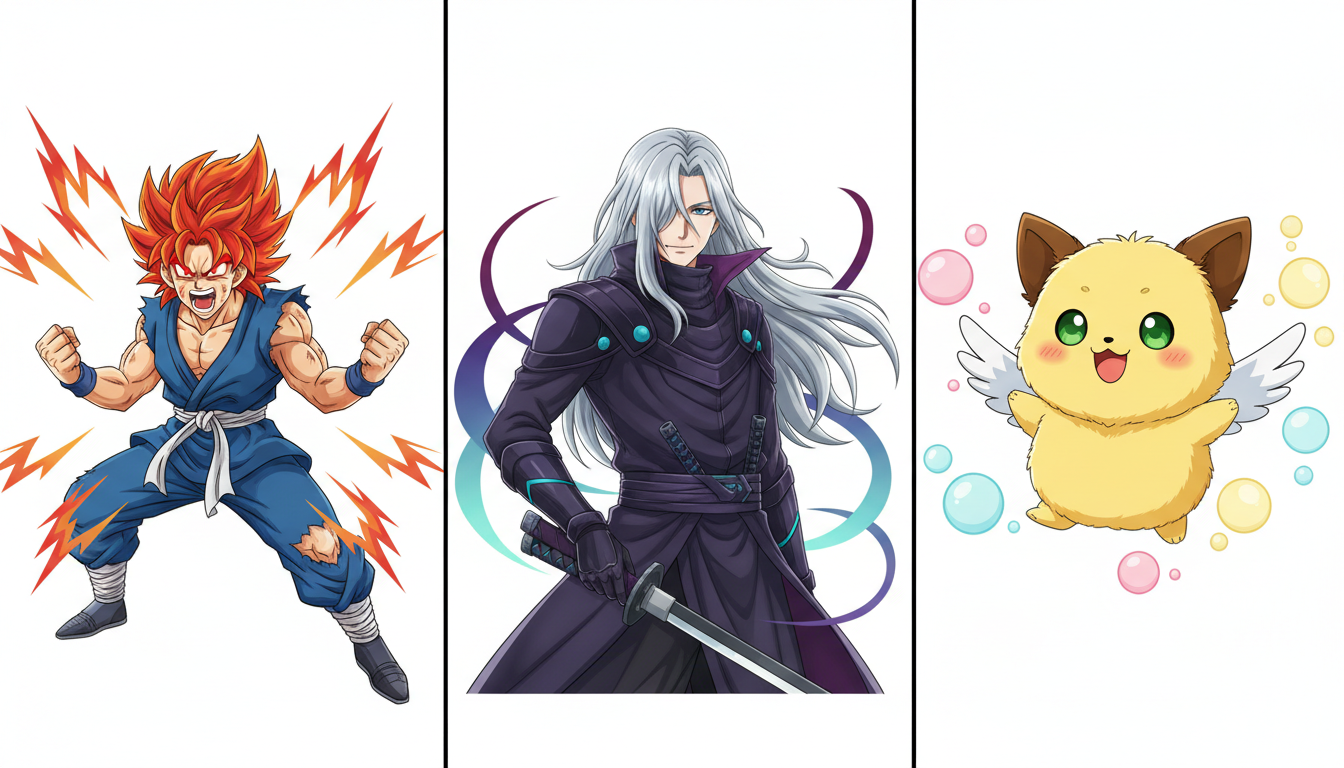
When selecting a voice profile, look for these three primary anime vocal archetypes:
- The Hot-Blooded Protagonist: Characterized by high pitch variation, raspy vocal fry, and a rapid, forward-leaning tempo. This profile thrives on exclamation points, elongated vowels, and aggressive punctuation.
- The Cool/Calculated Rival: Characterized by a lower register, steady pitch, slow pacing, and heavy pauses. This profile relies on subtext, requiring careful placement of ellipses to simulate quiet intensity.
- The Energetic Sidekick or Mascot: Characterized by a high-pitched, slightly nasal timbre and a bouncy, syncopated rhythm. This profile handles rapid-fire comedic dialogue and exaggerated reactions exceptionally well.
The Shonen Surge vs. The Slice-of-Life Whisper
A great voice director knows that different genres require entirely different directing strategies. In the realm of anime TTS, this division is most apparent when comparing high-octane action dialogue with quiet, introspective character moments.
The Shonen Surge: Channeling Raw Battle Energy
Action sequences require the AI to push past its natural limits of volume and intensity. Standard TTS engines often clip or distort when forced into high-energy delivery, or worse, they sound like they are yawning while reading a battle cry. To generate authentic Shonen energy, you must construct your text to force the engine to rise to the occasion. For a deep dive into pulling maximum theatricality out of your main characters, read our guide on directing an anime protagonist voice generator online.
When writing for action, use phonetic spelling to force the engine to elongate vowels (e.g., writing "I won't let you!" as "I won't... let yooouuu!"). This mimics the physical strain of a voice actor holding a note. Additionally, break up long sentences with frequent exclamation points to force the AI to reset its pitch baseline higher with each phrase.
The Slice-of-Life Whisper: Capturing Intimacy and Melancholy
Conversely, dramatic slice-of-life scenes or quiet monologues require the AI to drop its volume, introduce breathiness, and slow down. To achieve this, you must rely heavily on punctuation-based pacing. Standard spelling will cause the AI to rush through emotional beats. By inserting strategic ellipses and hyphens, you signal to the engine that it needs to pause, simulate a breath, and lower its pitch. This creates the illusion of vulnerability and quiet reflection.
The Prompting Playbook: How to Inject Pacing, Pauses, and Emotion into Raw Text
Punctuation is your director's baton. When working with an online AI voice generator, you cannot simply rely on standard grammar. You must write phonetically and structurally to force the performance you want. The table below illustrates how standard text compares to "AI-Directed" text when aiming for dramatic, anime-style delivery.
| Intended Emotion | Standard Text Input | AI-Directed Text Input | Acoustic Result |
|---|---|---|---|
| Shock & Hesitation | No way, this can't be happening. | N-No way... This... this can't be happening! | Adds a realistic stutter, a heavy dramatic pause, and a rising panic in the final delivery. |
| Smug Defiance | Is that all you have? How pathetic. | Is that... *all* you've got? Tch. How... pathetic. | Creates a slow, mocking cadence, introduces a classic anime scoff ("Tch"), and drops the final pitch. |
| Explosive Anger | I will never forgive you for this! | I will... NEVER... forgive you for thiiis!!! | Forces a heavy pause for emphasis on "NEVER" and elongates the final vowel for a screaming finish. |
| Quiet Melancholy | I guess this is where we say goodbye. | I guess... this is where... we say... goodbye. | Slows the tempo drastically, adding breathy spaces between thoughts to simulate sadness. |
To master this prompting playbook, keep these three golden rules in mind:
- Use "Tch", "Hmph", and "Gyaaa" literally: Anime-specific vocalizations are highly effective. Writing them out phonetically triggers the AI to pull from its training data for those specific, expressive sounds.
- Elongate vowels, not consonants: If you want a word held longer, write "Nooooo" instead of "Nnnnnno". Elongating consonants can confuse the phonetic engine, while elongating vowels naturally extends the note.
- Capitalization matters: Many advanced character-driven voice generators interpret all-caps words as cues for increased volume, emphasis, and emotional intensity.
Beyond the Audio: Integrating Anime Voices into Interactive Workflows
Once you have generated and polished your custom voiceovers, the next step is integrating them into your creative pipeline. For content creators making TikToks, YouTube Shorts, or anime music videos (AMVs), high-quality dialogue serves as the emotional anchor for your visual edits. Syncing the generated audio's dramatic pauses with quick visual cuts or sudden lighting shifts in your video editor maximizes the impact of the scene.
But voice generation is only one side of the coin. Many creators are moving beyond static, one-way audio clips and bringing these characters to life in real-time. If you want to take these voices into a dynamic, two-way conversation, check out our protocol on how to chat with virtual anime heroes online for immersive roleplay. With Fanfun's suite of interactive tools, you can transition seamlessly from directing pre-scripted voiceovers to engaging in real-time, voice-enabled roleplay with AI personas, unlocking entirely new ways to interact with your favorite characters.
How do I make an online AI anime voice sound angry or excited instead of flat?
To break the flat delivery of standard TTS, use phonetic spelling and aggressive punctuation. Capitalize words you want emphasized (e.g., "NEVER"), elongate vowels (e.g., "Nooooo!"), and insert classic anime vocalizations like "Tch," "Hmph," or "Gyaaa!" to trigger the model's emotional training data.
Can I use anime text-to-speech for commercial video edits and TikToks?
Yes, many creators use AI-generated voices for social media edits, TikToks, and YouTube videos. However, always ensure you are using a platform like Fanfun that respects creative ethics and check the specific terms of service regarding commercial use of character-inspired models.
What is the best way to add dramatic pauses to anime TTS generation?
The most effective way to introduce dramatic pauses is by using ellipses (...) and hyphens (-) strategically. An ellipsis creates a natural, breathy pause where the AI resets its pacing, while a hyphen creates a sudden, abrupt stop—perfect for simulating stutters or interruptions.
Is there an online anime voice generator that does both male and female character voices?
Yes, Fanfun features a diverse, growing library of both male and female anime-style character voices. These models cover a wide range of archetypes, from high-pitched energetic mascots and female protagonists to deep, gravelly male rivals and heroes.



