
How to Create a Secret Santa Reveal Video: Clue Structures and Script Templates
Ditch the boring paper card. Learn how to structure a high-suspense, three-step clue video that turns your Secret Santa reveal into an interactive guessing game for your office or friend group.
To create an engaging Secret Santa reveal video, use a structured "clue-and-reveal" format that builds suspense through a progressive funnel of three distinct clues before disclosing your identity. Keeping the video under 45 seconds ensures it remains fast-paced and easy to share across office channels or group chats. Rather than relying on a basic paper card, a short, well-paced video turns your holiday gift exchange into an interactive guessing game, especially when delivered through a creative format like a themed selfie or a pop-culture character voiceover.
At Fanfun, we believe that digital gifts should be just as memorable as physical ones. Instead of a passive greeting, our platform lets you generate custom character-style video messages that can act as the perfect, high-suspense Secret Santa reveal. By choosing a recognizable virtual icon to deliver your clues, you can turn a simple office exchange into a highly shareable moment that stands out from standard holiday cards.
The 3-Step Clue-Reveal Video Framework
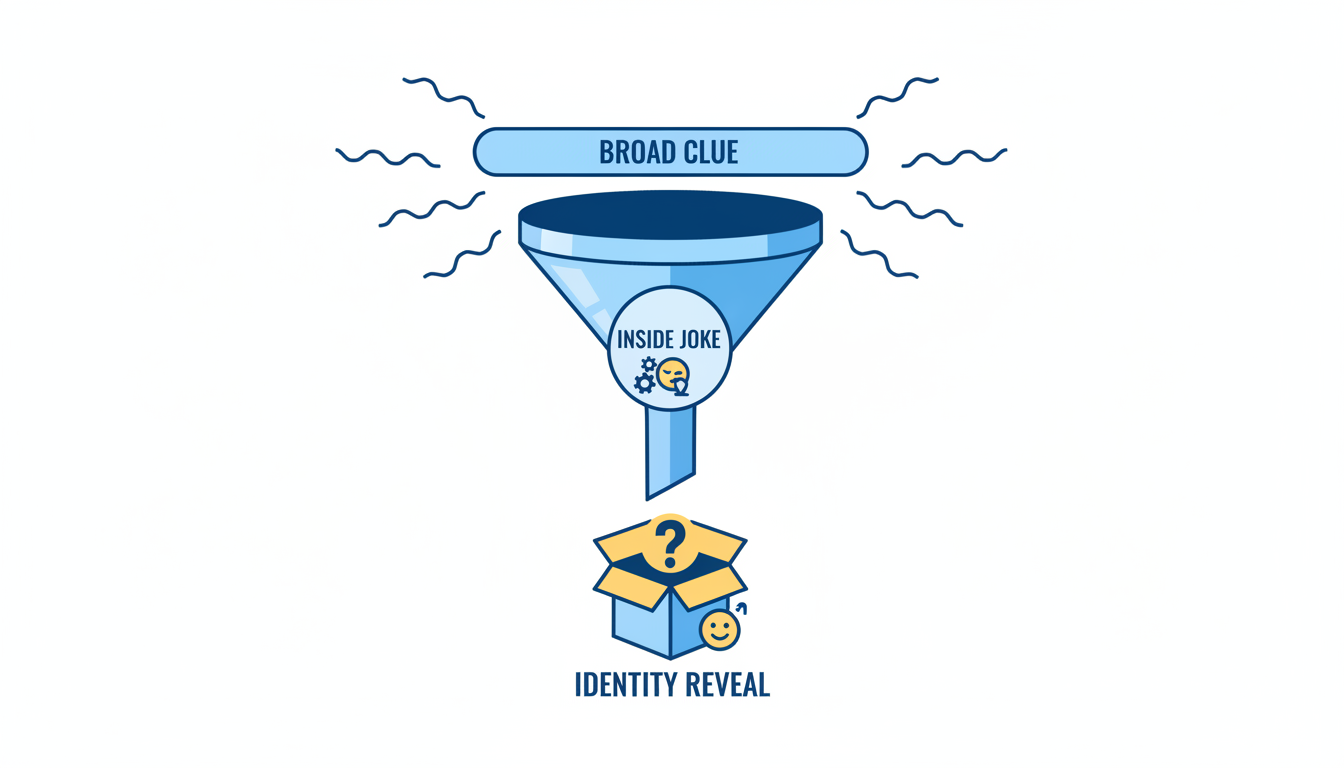
The key to a memorable reveal video is pacing. If you reveal your identity too quickly, you lose the suspense; if you drag it out too long, the joke loses its punch. To keep your video engaging, structure your message around a progressive funnel of clues that narrows from broad characteristics to highly specific inside jokes.
To design an effective reveal, follow this three-step progression:
- Clue 1: The Broad Filter (The Misdirection): Start with a wide, slightly ambiguous clue that could apply to several people in your group. This sets the stage and gets the recipient guessing across a broad pool of candidates.
- Clue 2: The Hyper-Specific Inside Joke: Drop a hint that only the two of you—or a small subset of your team—would immediately recognize. This could reference a shared project mishap, a specific daily habit, or an ongoing joke.
- Clue 3: The Identity Reveal: Deliver the final reveal clearly and with high energy. State your name or show your face to resolve the mystery.
To maintain high energy and ensure the file is easy to share, keep your entire video under 45 seconds. This length is ideal for instant messaging platforms and prevents the pacing from dragging. When deciding how to produce your video, compare the interactive nature of a clue-reveal video to standard digital formats by reading our guide on choosing the right digital gift format.
Choosing Your Video Format
Depending on your group's culture and your comfort level on camera, you can choose from several production styles. Use the decision table below to choose the best format for your recipient:
| Format Style | Best For | Production Effort | Key Advantage |
|---|---|---|---|
| Selfie Video | Close friends, small teams | Low (Single-take phone recording) | Highly personal, authentic delivery |
| Character Voiceover | Pop-culture fans, remote offices | Medium (Scripting + AI generation) | High novelty, excellent comedic timing |
| Cinematic Slideshow | Large groups, formal settings | Medium (Editing app templates) | Polished look, easy to include photos |
Three Creative Video Reveal Concepts
If you want to move beyond a basic selfie recording, using a distinct thematic concept can make your reveal video stand out. Here are three creative concepts you can execute using simple editing tools or digital voice options.
Concept 1: The Virtual Icon Interrogation
Instead of presenting the clues yourself, have a famous fictional hero, villain, or cultural icon deliver them. By using an AI character voice generator, you can script a custom monologue where a recognizable persona "interrogates" the recipient about who their Secret Santa might be. This format works incredibly well for remote teams who share a love for specific movies, gaming, or pop culture. If you want to see how virtual icons can elevate other types of video announcements, check out our guide on creative product launch video ideas powered by virtual icons.
Concept 2: The True Crime Mockumentary
Frame your gift-giving as an unsolved mystery. Use dramatic, slow-paced narration, black-and-white filters, and tense background music. Present the "evidence" of your identity step-by-step: a coffee mug left in the sink, an oddly specific Slack reaction, or a shared calendar invite. To see why structured narrative videos outperform static photo compilations, check out our breakdown of digital video ideas that actually get rewatched. If you want to lean even further into a cinematic, spooky, or dramatic theme, you can also adapt the suspense-building techniques found in our guide to scripting cinematic invitations.
Concept 3: The Pop-Culture Roast
Deliver a series of lighthearted, affectionate roasts about the recipient's daily habits before revealing yourself. Focus on harmless, relatable topics—like their dedication to a specific afternoon snack, their extensive collection of custom desk keyboards, or their signature sign-off phrase in emails. Conclude the roast by showing that your gift was chosen specifically to match or celebrate these unique quirks.
Editable Script Template: The Character Clue-Drop
This script template is designed to build suspense using a character-driven format. You can customize the placeholders below to fit your recipient, then record the voiceover yourself or use a digital voice generator to bring it to life. If you are managing holiday video scripts for family members instead of coworkers, explore our guide on scripting personalized Santa videos.
"Attention, [Recipient Name]. I have been tasked with delivering a message
from a highly covert, highly festive operative. Yes, your Secret Santa.

Our suspect is someone who knows you all too well.
For instance, they know about your absolute obsession with [Broad Clue, e.g., iced coffee in freezing weather].

But more importantly, they were there during [Specific Inside Joke, e.g., the great spreadsheet collapse of Q3].

Who am I talking about? Well, look under the wrapping paper.
Your Secret Santa is... [Your Name]!
Enjoy the gift, and try to act surprised."
Tips for Writing a Character-Driven Secret Santa Script
If you decide to use an AI voice generator or character persona on Fanfun to deliver your script, a few simple writing adjustments can make the final video sound incredibly natural:
- Write for the character's persona: Match your script's tone to your selected character's established style. A dramatic character works best with grandiose, suspenseful phrasing, while a cartoon character can handle high-energy, playful teasing.
- Keep sentences short and conversational: Long, complex sentences can sound unnatural in a voiceover. Break your clues into brief, punchy statements that build suspense naturally.
- Simplify complex jargon: If your office uses highly technical terms or obscure acronyms, try replacing them with simpler, everyday descriptions to ensure the flow of the script remains smooth and easy to follow.
Technical Execution: Delivery and Metadata Safety
The best reveal video can still be ruined if the recipient accidentally sees the sender's details before watching. To keep your identity completely hidden until the final frame, follow these practical technical steps.
1. Clean Your Metadata and File Names
Before sending your video file, ensure that your identity isn't hidden in plain sight. Take these precautions:
- Rename the file: Avoid default export names or direct giveaways like
Secret_Santa_From_Sarah.mp4. Rename the file to something neutral, such asOpen_Me_First.mp4orYour_Holiday_Clue.mp4. - Strip metadata: On Windows, right-click the video file, select Properties, go to the Details tab, and click Remove Properties and Personal Information. On macOS, you can use basic video utility tools or export the file through a messaging app that automatically strips metadata (like Discord) to ensure your name is not attached to the file creator field.
2. Choose an Anonymous Delivery Method
Depending on whether your exchange is virtual or in-person, you have several secure options for delivering the video:
- QR Code on the Physical Gift: Print a QR code and attach it to the outside of the wrapped present with a label reading "Scan Me Before Opening." You can host the video on a private YouTube link (set to Unlisted) or a Google Drive link set to "Anyone with the link can view."
- Anonymous Email or Messaging Bots: If your team uses Slack or Discord, use an integration bot (like Secret Santa Bot) to deliver the link anonymously. Alternatively, use a free anonymous email service to send the video link directly to their inbox on the morning of the exchange.
- Shared Drive Drop: Have the exchange organizer collect all reveal videos beforehand and drop them into a shared folder simultaneously once all physical gifts have been delivered.
3. Time the Drop Perfectly
Coordinate the delivery of your video with the physical unwrapping. If you are shipping a gift to a remote coworker, track the package and send the anonymous video link shortly after the delivery notification arrives. This ensures they have the video ready to watch the moment they sit down to open their gift, making the reveal an active part of the unwrapping experience. Just as with other major life events where personal touchpoints matter—like learning how to script and scale thank you video messages for wedding guests—timing is everything when delivering a digital surprise.
How do I send a Secret Santa video anonymously?
The easiest way is to upload your video to a cloud service (like Google Drive or Dropbox) or as an unlisted YouTube video, then generate a shareable link. You can send this link using an anonymous email service, an office Slack/Discord bot, or by printing the link as a QR code and taping it to the physical gift box.
What should I do if the recipient guesses my identity before the video ends?
To prevent early guesses, structure your script so the first clue is highly ambiguous and could apply to multiple people. Keep the most revealing inside joke for the final five seconds right before your name is shown. This keeps the guessing game active for the entire duration of the video.
Can I use a custom voice if I don't want to use my own?
Yes. If you prefer to remain completely anonymous or want to add a comedic element, you can use an AI voice generator or select a fictional character persona on Fanfun to read your script. This hides your voice entirely and adds a highly entertaining, professional touch to the reveal without requiring any complex video editing skills.



