
How to Calculate the Reading Time of Your Virtual Character Script
Want to make sure your custom AI character message fits? Use our quick guidelines to estimate your script's duration before generating your video.
To estimate the reading time of a virtual character script, you can use standard conversational speech rates as a general guide. On Fanfun, one video credit covers up to 30 seconds of speech, and you can see the estimated credit cost before you generate your video. Estimating your script's duration beforehand helps you plan your message and manage your credits effectively.
The Timing Preparation Checklist
- Listen to character samples to gauge their general speaking speed.
- Count the total words in your draft script.
- Apply a general conversational estimation (such as 130 to 150 words per minute) to find a baseline.
- Read your script aloud to check the flow and natural pauses.
Editable 30-Second Script Template
"Hey [Name]! I heard you are celebrating your [Occasion] today. That is absolutely massive! I wanted to drop in and personally wish you the absolute best. Remember to take a break, enjoy some cake, and celebrate your hard work. You have earned every bit of it. Have an incredible day, and keep shining!"
The Quick Word-to-Time Estimation Formula
While human speakers can easily adjust their speed on command, virtual characters deliver lines at their own pace. Since a single Fanfun video credit covers up to 30 seconds of speech, keeping your script concise is a practical way to manage your credit usage. Writing a script that fits within your target duration is key; for more detailed tips, you can read our guide on how to write a perfect 30-second script for a virtual character video.
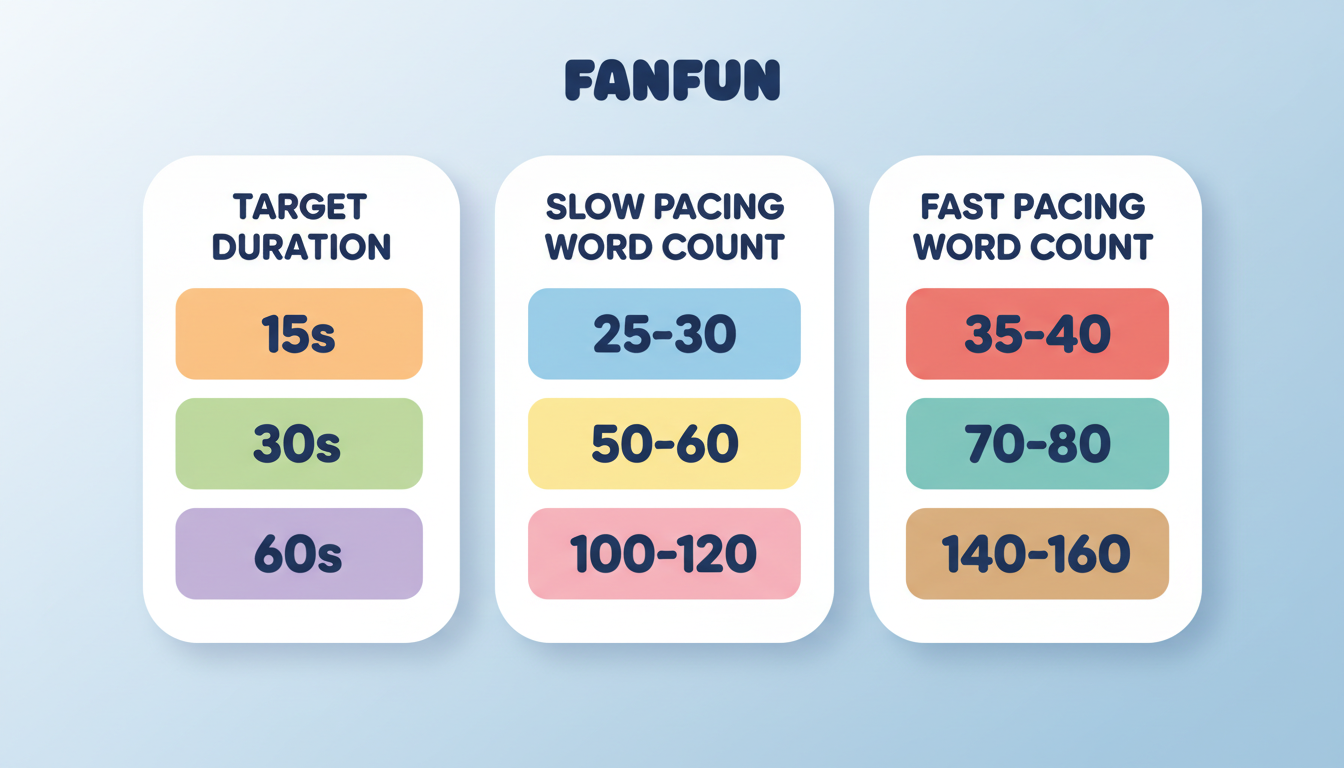
The table below shows general word count estimates based on a standard conversational rate of 140 words per minute. These are illustrative baselines to help you draft your script, as actual delivery times may vary:
| Target Duration | Estimated Word Count |
|---|---|
| 15 Seconds | ~35 words |
| 30 Seconds | ~70 words |
| 60 Seconds | ~140 words |
Step-by-Step Calculation with a Worked Example
To estimate the length of your customized message, you can use a standard conversational baseline of 140 words per minute (WPM) as a starting point. When crafting your message, review the art of the AI character shoutout to structure your greeting effectively. Let's walk through an example using a birthday greeting.
Consider this draft script: "Happy Birthday, Sarah! I can't believe you are turning thirty today. It feels like just yesterday we were causing trouble in college. I hope your day is filled with lots of laughs, good food, and maybe a little bit of mischief. You deserve the best year ahead. Cheers to you, my friend!"
To estimate its reading time using a standard conversational baseline of 140 WPM:
- Count the words: The draft contains exactly 52 words.
- Divide by the baseline WPM: 52 / 140 = 0.371.
- Convert to seconds: 0.371 * 60 = 22.3 seconds.
At 22.3 seconds, this script comfortably fits within a single 30-second Fanfun credit. This buffer allows the character to deliver the lines naturally without rushing the final delivery.
Adjusting for Character Pacing
When selecting a voice, it is helpful to choose the right virtual character archetype first and listen to their sample videos to get a feel for their natural cadence.
If a character has a slower, more deliberate delivery, a longer script might run over your target duration, potentially requiring additional video credits. Conversely, a faster delivery might finish the script more quickly. Checking the credit estimate on Fanfun before generating helps you see the final credit cost for your specific script.
How to Trim or Expand Your Script for the Perfect Fit
If your calculation shows your script is slightly too long or too short, you can easily adjust the timing using basic editing techniques:
- Structure your phrasing: Use clear, concise sentences to help the character deliver the message naturally. Breaking up long run-on sentences makes the script easier to follow.
- Cut the fluff: If your script is running longer than your target duration, remove repetitive adjectives. Change "I hope you have an absolutely incredible, wonderful, and amazing day" to "I hope you have an amazing day."
- Incorporate natural filler: If your script is running too short, add brief transition words like "Well," "Oh," or "Believe me," which match conversational speech patterns.
How can I estimate if my script will fit before generating?
You can estimate the length by reading your script aloud at a normal conversational pace. Fanfun also provides an estimate of the credit cost based on your script length before you create the video, helping you adjust your word count beforehand.
What happens if my script runs slightly over the 30-second mark on Fanfun?
On Fanfun, one video credit covers up to 30 seconds of speech. If your script's calculated length exceeds 30 seconds, the system will estimate the credit cost before you hit generate. Keeping your script concise and checking the estimate before generating helps you stay within your desired credit usage.
How do I choose a character with the right pacing for my script?
You can browse the character selection on Fanfun and tap on any character card to watch a sample video. This allows you to hear their natural speaking style and cadence, helping you tailor your script's word count to match their delivery.



