How to Choose and Direct AI Narration Tools for Independent Docuseries
Indie filmmakers can use AI voiceover tools to create high-impact docuseries on a budget. Learn how to choose the right vocal texture and direct natural pacing.
Independent filmmakers can successfully use AI narration tools to produce compelling docuseries by matching the synthetic voice's texture to the project's genre and actively directing the generation process. While modern voice generators offer affordable, rapid, and highly customizable alternatives to traditional voice actors, they cannot replicate spontaneous human emotion out of the box. Achieving a cinematic result requires manual script styling, phonetic adjustments, and careful post-production mixing rather than relying on a "one-click" default generation.
The Rise of Synthetic Voice in Documentary Filmmaking
For independent filmmakers, the logistical hurdles of producing a multi-part docuseries can be overwhelming. Traditional voiceover casting requires studio time, expensive talent fees, and scheduling coordination. AI voice generators have emerged as a viable solution, allowing creators to rapidly prototype scratch tracks, localize content for global audiences, and complete entire narrations on a fraction of a traditional budget. However, synthetic voice tools are not a magic, instant fix. While they excel at delivering clean, consistent speech, they lack the innate human ability to interpret subtext, irony, or spontaneous emotional shifts without active human intervention.
To determine if synthetic narration is right for your project, look closely at your subject matter. A highly abstract, analytical, or historically focused documentary can benefit immensely from a stylized, steady synthetic voice. Conversely, an intimate, deeply personal story that relies on raw, fragile human emotion may still require a traditional voice actor. If you decide to go the digital route, success lies in active direction. You must approach the software not as a passive utility, but as a voice actor that needs specific, hands-on guidance. For a deeper dive into establishing the right editorial framework before you even open your voice generator, consult our guide on scripting and casting high-impact narration for mini-docs.
A Framework for Matching Vocal Personas to Your Genre
Every documentary genre has an established sonic palette. Choosing the wrong voice texture can instantly break immersion for your audience. When evaluating AI narration tools, look beyond the default settings and seek out platforms that offer fine-grained control over vocal age, breathiness, and regional accents. This level of control allows you to craft a specific persona rather than settling for a generic, robotic readout.
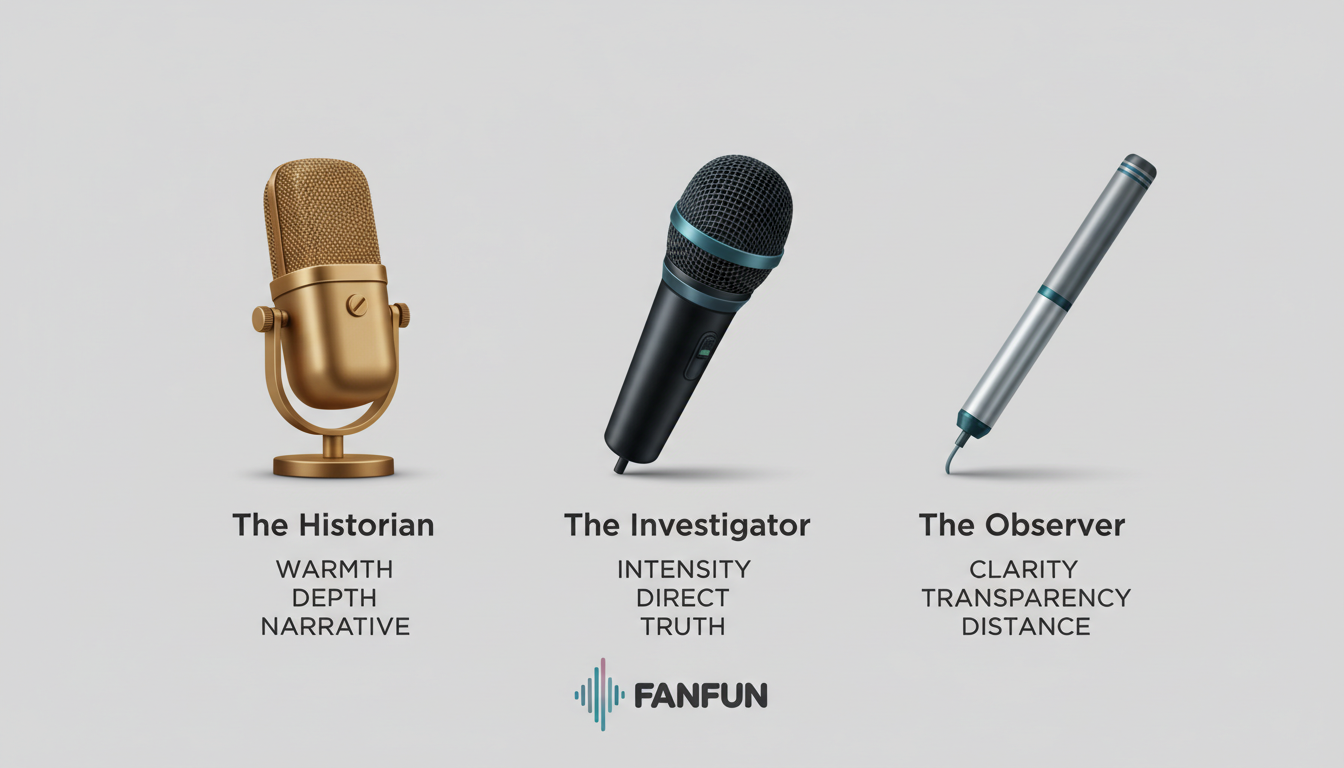
Consider these three common vocal archetypes for independent docuseries:
- The Warm Historian: A soft, slightly raspy, and slower-paced tone. This voice excels in archival, biographical, or historical documentaries where the narrator needs to sound authoritative yet deeply human and reflective.
- The Gritty Investigator: A lower-register, steady, and intense delivery. This style is perfect for true crime, investigative journalism, or political exposés where a sense of urgency and gravity is paramount.
- The Objective Observer: A neutral, clear, and highly articulate voice. This is the classic "voice of god" style best suited for science, nature, and technology topics where clarity and impartiality are key.
To help you select the right fit, use this decision framework to match your docuseries style to the ideal vocal parameters:
| Genre Archetype | Ideal Tone | Target Cadence | Key Parameter to Adjust |
|---|---|---|---|
| Historical / Archival | Warm, raspy, mature | Slow (110-120 WPM) | Increase breathiness and age |
| True Crime / Investigative | Low-register, intense, serious | Moderate (130-140 WPM) | Lower pitch, reduce vocal variance |
| Science / Nature | Clear, articulate, neutral | Standard (140-150 WPM) | Optimize clarity, neutral accent |
By carefully mapping these parameters, you can avoid the common pitfall of a flat, robotic delivery. If you are still exploring the landscape of digital voice options, check out our comprehensive guide on choosing and directing digital voiceover tools to avoid monotone delivery.
How to Direct an AI Voice Generator for Natural Pacing
Even the most advanced voice models will sound robotic if you simply paste a standard script and hit generate. Humans do not speak in perfectly spaced, uninterrupted blocks of text. We pause for breath, linger on key words, and accelerate when expressing excitement. To replicate this natural rhythm, you must actively "direct" the software using script-formatting workarounds.
First, master the art of punctuation hacks. AI voice generators interpret punctuation as physical cues. A standard comma provides a brief pause, but a double period (..) or an ellipsis (...) can force a longer, more contemplative pause. Em-dashes (—) are excellent for creating sudden shifts in thought, forcing the voice to pause and pivot naturally. Second, employ phonetic spelling. AI tools frequently stumble on specialized terminology, historical names, or regional slang. If a name like "Caius" is mispronounced, rewrite it phonetically in your script as "Kie-us" to guide the generator to the correct pronunciation.
At Fanfun, we view voice generation through a character-first lens. Whether you are creating fun, personalized voice notes or generating video gifts, the secret to natural pacing is matching your script's rhythm to the natural cadence of a specific persona. Instead of forcing a generic, flat voice model to fit your words, select an AI character with an established personality and write your dialogue to match their natural speech rate, pauses, and emotional style. This character-driven approach ensures that the performance feels organic and intentional from the very first take.
Integrating Synthetic Narration into Your Post-Production Workflow
The creative process does not end when you download your generated audio. To make synthetic narration sound truly cinematic, you must integrate it properly into your post-production workflow within your digital audio workstation (DAW) or video editor.
Always export your generated audio in an uncompressed format, such as a 24-bit WAV file, rather than a highly compressed MP3. This preserves the full frequency spectrum of the voice, giving you more flexibility during the mixing stage. Once the audio is in your timeline, use the "room tone" trick. Synthetic silence is perfectly quiet, which instantly exposes the voice as artificial. Layer a subtle track of low-volume ambient room tone or natural environmental noise underneath the entire voiceover track. This simple step masks the synthetic silence between words and glues the narration to the visual environment.
Finally, apply basic EQ and compression to add cinematic weight. Roll off the extreme low-end frequencies (below 80Hz) to remove muddy rumble, gently boost the presence range (around 3kHz to 5kHz) for clarity, and apply light compression to smooth out any sudden volume spikes. For filmmakers looking to expand their digital toolkit, exploring the best production tools for faceless video creators can provide additional workflow integrations to elevate your final cut.
Can I legally use AI-generated voices in a commercial docuseries?
Yes, but it depends entirely on the terms of service of the tool you use. Many platforms require a paid commercial license to use their generated voices in monetized or distributed films. Always review the licensing agreement of your chosen software before releasing your docuseries.
How do I handle foreign language translation and accents using AI narration tools?
Most advanced AI voice generators support multi-language synthesis and regional accent targeting. When localizing, it is best to translate the script first, then generate the voice using a model specifically trained in the target language's native accent, rather than forcing an English-trained model to speak a foreign language phonetically.
Is it possible to clone my own voice to narrate my documentary?
Yes, many professional voice platforms allow you to upload clean audio samples of your own voice to create a digital clone. This is an excellent way to maintain a consistent narrative voice across multiple episodes without needing to re-record pickups or corrections in a studio.