
The Hook Factor: How to Craft Personalized YouTube Video Intros That Stop the Skip
Ditch the boring 3D logo animations. Discover how to structure high-retention, personalized YouTube intros using dynamic scripting, pattern interrupts, and instant AI character cameos to keep viewers hooked from the very first frame.
The opening 10 seconds of your YouTube video dictate whether a viewer stays for the long haul or clicks away to a competitor. Yet, countless creators still waste this prime real estate on self-indulgent, 3D animated logos accompanied by generic electronic music. This outdated approach signals to the viewer that the actual value of the video hasn't started yet, practically begging them to hit the skip button or close the tab.
Modern audience retention requires an immediate, high-impact hook that promises value, disrupts the scrolling pattern, and feels deeply contextual to the topic at hand. By shifting from static branding to dynamic, personalized introductions—including unexpected pop-culture cameos powered by Fanfun—you can transform your video's opening moments into an un-skippable event.
Why Traditional YouTube Intros Are Dead (And What to Do Instead)
On YouTube, attention is the ultimate currency, and the transaction happens in the first 5 to 15 seconds. According to YouTube’s creator analytics, this is the period where the steepest drop-off in viewer retention occurs. If your intro consists of a spinning logo or a slow-paced greeting like, "Hey guys, welcome back to my channel," you are actively training your audience to click away.
Modern retention strategy demands an immediate pattern interrupt. A pattern interrupt is an unexpected event, visual cue, or statement that breaks a viewer out of their passive scrolling state. Instead of showing them what they expect, you must hit them with immediate narrative momentum. This could be a dramatic statement, a visual punchline, or a highly specific call-out that addresses the exact reason they clicked your thumbnail.
True personalization in a video intro isn't just about saying the viewer's name—it is about matching the intro's tone, pacing, and visual style directly to the specific topic and subculture of your video. If you are reviewing a high-octane gaming title, your intro should feel like a cinematic cinematic drop. If you are teaching a complex coding tutorial, it should jump straight into the painful bug your viewer has been trying to solve for hours. The goal is to make the viewer feel like the video was custom-built for them.
Designing the Attention-Hijacking Intro Structure
To consistently keep viewers past the critical 15-second mark, you need a repeatable structure. The most effective framework for this is the 3-Step Hook Blueprint. This sequence is designed to establish stakes, introduce novelty, and secure the viewer's commitment to watch the entire video.
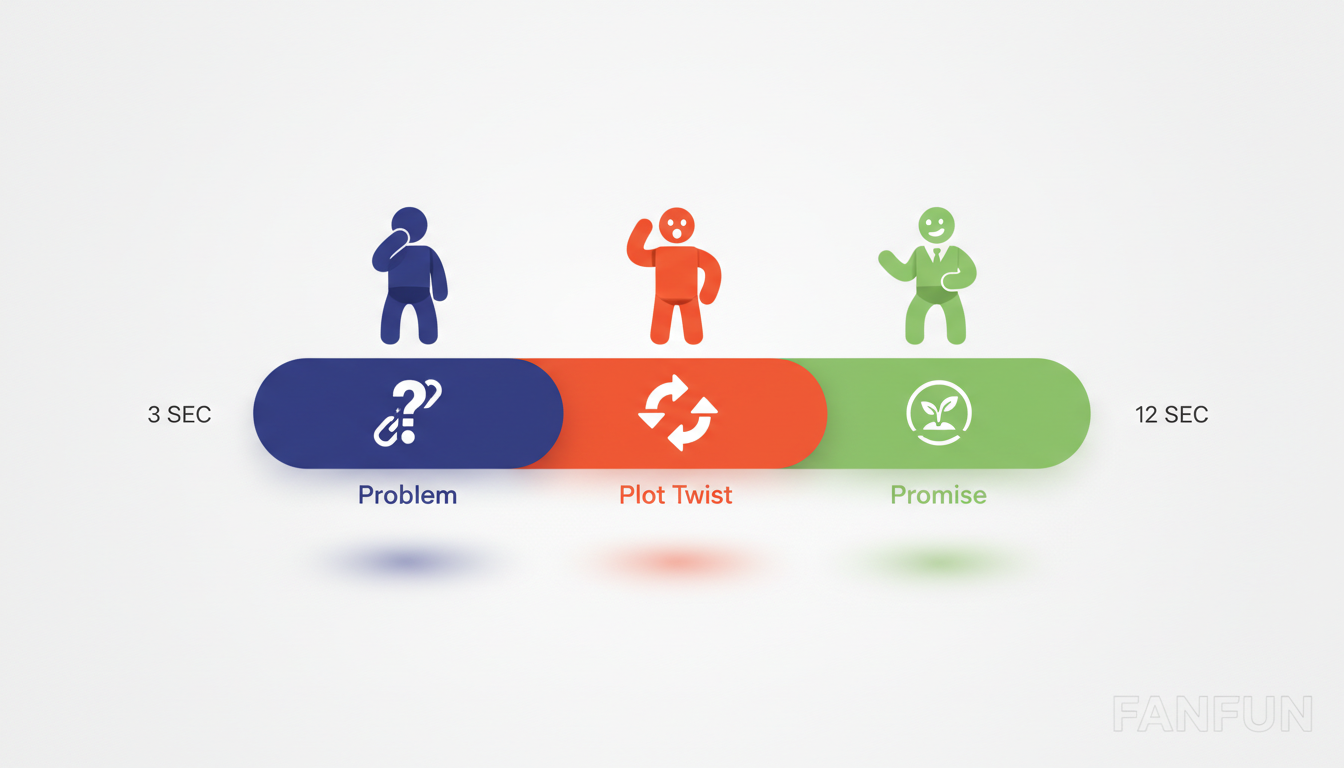
- Step 1: The Problem (Seconds 0–4): Immediately state the viewer's pain point or the core question of the video. Do not introduce yourself yet. Focus entirely on their current reality. E.g., "You've spent three hours editing your video, but your CTR is still sitting at a flat 1%."
- Step 2: The Plot Twist (Seconds 5–8): Introduce an unexpected element, a surprising statistic, or a visual gag that challenges their assumptions. This is where you disrupt the standard format.
- Step 3: The Promise (Seconds 9–12): Clearly state what they will learn, see, or experience by the end of the video, establishing a clear narrative loop. E.g., "By the end of this video, you'll have three copy-and-paste thumbnail formulas that double your views overnight."
The Anatomy of a 12-Second Script
Keeping this entire sequence under 12 seconds is critical to prevent viewer fatigue. Every word must earn its place on your timeline. When writing your intro, avoid passive verbs, cut out throat-clearing sentences, and transition seamlessly into your main content without pausing for breath. If you need inspiration for structuring your script, consider discussing how to structure your script for maximum viewer engagement using proven pacing frameworks to keep your audience locked in from frame one.
Injecting Star Power: Using AI Character Cameos to Hook Your Audience
One of the most powerful pattern interrupts you can use is the unexpected guest. Imagine opening a video about productivity, and instead of your own voice, a legendary anime protagonist or a world-famous sports icon is directly addressing the audience, hyping up the topic of your video. This instantly elevates your production value and makes your content stand out from thousands of identical creators in your niche.
Historically, securing a celebrity shout-out meant paying hundreds of dollars on platforms like Cameo and waiting days, if not weeks, for a video that might not even align with your script. With Fanfun, creators have access to an instant, highly affordable alternative. By leveraging Fanfun’s AI personalized video and voice platforms, you can generate custom, high-impact intros featuring iconic cultural figures and fictional characters in minutes.
Consider these creative applications to match your channel's specific subculture:
- The Gaming Channel: Have an iconic anime hero deliver a customized battle speech warning viewers that they aren't ready for the secret boss guide you're about to show them.
- The Fitness Tutorial: Feature a legendary sports icon delivering a brief, high-energy motivational roast to get viewers off the couch and ready to follow your workout routine.
- The Pop Culture Essay: Use a beloved cartoon character to introduce a deep-dive analysis of their own franchise, immediately setting a playful, engaging tone.
This approach gives independent creators massive production leverage. By generating custom, high-impact character videos in just a few minutes, you can create hyper-contextual, funny, and memorable openings that your audience has genuinely never seen before.
The Creator’s Toolkit: Comparing Intro Styles and Production Effort
Choosing the right intro style depends heavily on your channel's niche, your editing workflow, and how much time you can dedicate to post-production. To help you decide, here is a comparison of the four main intro styles used by top-tier creators today:
| Intro Style | Production Time | Viewer Retention Impact | Cost | Setup Complexity |
|---|---|---|---|---|
| The Animated Logo | Low (Once created) | Negative (High skip rate) | Low to Medium | Very Low |
| The Self-Shot Hook | Medium | Medium to High | Free | Medium |
| The AI Character Cameo (via Fanfun) | Low (Minutes to generate) | Extremely High (Pattern interrupt) | Very Low | Low |
| The Kinetic Text Montage | High | High | Free (But high time cost) | High |
While a self-shot hook is highly authentic, pairing it with an AI character cameo creates a powerful one-two punch. You get the immediate shock value of a recognizable character, followed seamlessly by your own personal commentary, keeping retention high without draining your weekly editing schedule.
Technical Setup: Integrating Your Personalized Intro Seamlessly
Even the most creative intro will fail if it feels disjointed or poorly edited. When blending external assets, character voices, or custom video clips into your project, you must ensure the transition feels intentional and professional.
First, pay close attention to audio balancing. If your voiceover is recorded on a studio microphone and your intro clip has a completely different acoustic profile, the sudden jump will jar the viewer. When using synthetic voices or external character clips, spend time directing and balancing synthetic voices to sound natural alongside your main commentary. Apply a light compressor and a matching EQ curve to both tracks so they sound like they exist in the same acoustic space.
Second, utilize J-cuts and L-cuts to smooth out the visual transitions. A J-cut allows the audio of your upcoming scene or your own voice to start playing before the visual cut occurs. An L-cut does the opposite, keeping the audio of your intro character playing for a brief second over your main video footage. This simple editing trick prevents the abrupt, choppy feeling of hard cuts and keeps the narrative flowing naturally into your main content.
Finally, maintain asset consistency. If your personalized character intro features vibrant, high-contrast colors, make sure your primary video footage doesn't immediately cut to a washed-out, poorly lit camera angle. Use a cohesive color grade or a subtle transitional overlay—like a quick VHS glitch or a camera flash—to make the transition feel like a deliberate, high-budget creative choice.
How long should a YouTube intro be to keep viewer retention high?
Your YouTube intro should ideally be between 8 and 12 seconds. Anything longer than 15 seconds risk boring the viewer and causing a massive drop-off in retention. The goal is to state the problem, introduce a pattern interrupt, and deliver your value promise as quickly as possible before diving straight into the core content.
Can I use AI voices in my YouTube video intros without getting demonetized?
Yes, you can use AI voices in your video intros. YouTube's monetization policies target low-effort, auto-generated, repetitive content that provides no original value. When you use AI voices creatively as a stylized element, a parody, or a character cameo within a highly edited, original video, it is fully compliant with YouTube's guidelines.
How do I make a personalized YouTube intro if I don't want to show my face?
Faceless creators can create highly engaging personalized intros by combining dynamic kinetic typography, high-energy stock footage, and custom AI character voiceovers from Fanfun. By focusing on strong visual storytelling, sound design, and a compelling script, you can build a massive audience without ever appearing on camera.
What is the best software for editing custom video intros?
For professional results, industry-standard editing suites like Adobe Premiere Pro, DaVinci Resolve, or Final Cut Pro are highly recommended because they allow precise control over J-cuts, audio EQ, and color grading. For quick, mobile-friendly editing, tools like CapCut offer excellent built-in templates and transitions that make integrating custom clips incredibly straightforward.



