
How to Structure a Script for a Virtual Character Pep Talk
Want to send an encouraging video message that hits home? Learn how to structure a 30-second virtual character pep talk using a simple four-part framework designed for synthetic voices.

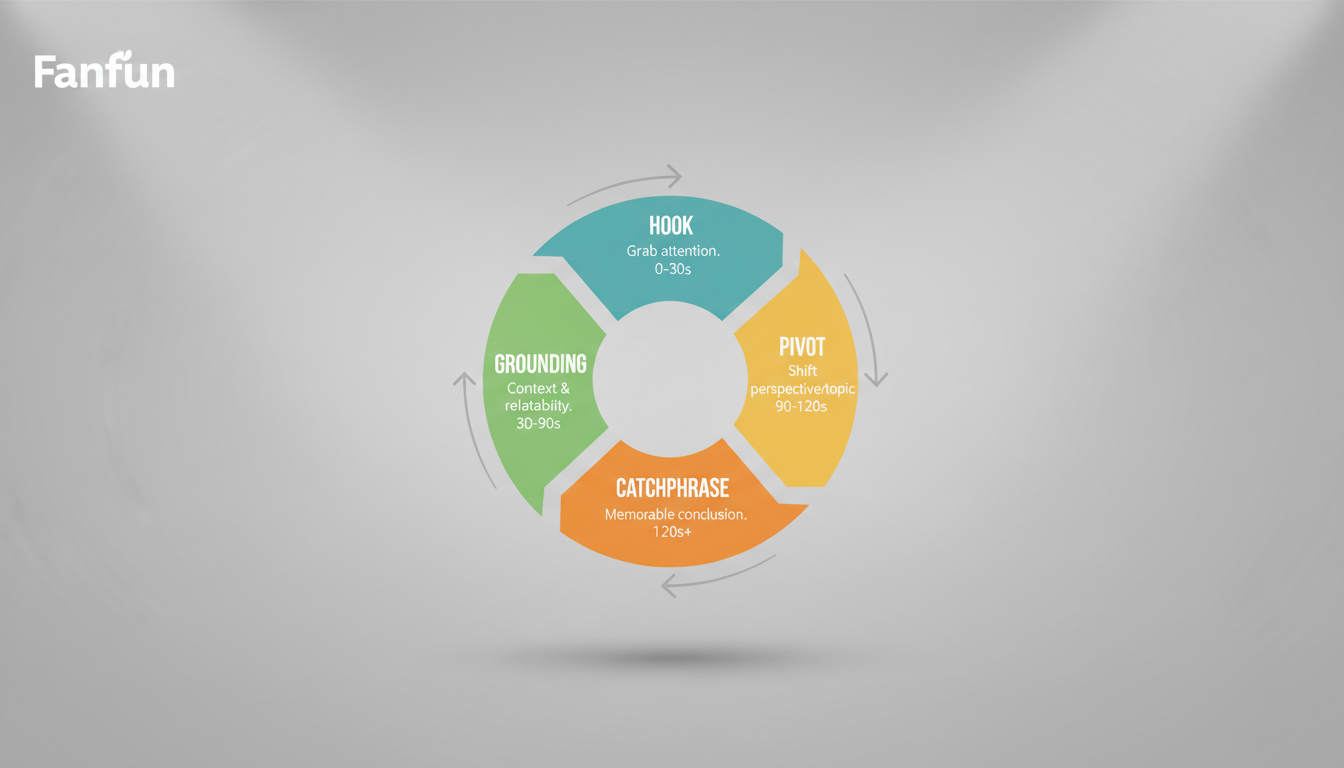
A great virtual character pep talk is structured as a high-impact, 30-second burst of energy containing four key elements: an attention-grabbing hook, a grounding detail, an emotional pivot, and a punchy catchphrase. Because synthetic voices perform best with brief, energetic lines, keeping your script under 75 words helps maintain a high-energy delivery. While AI personas can sound remarkably spirited, they are stylized digital characters rather than perfect voice replicas, so focusing on clever writing is the best way to make your video message on Fanfun feel genuinely motivating and fun.
The 4-Part Structure for a High-Energy Pep Talk Script
To keep an audience engaged, a virtual pep talk needs to get straight to the point. Long-winded introductions or overly complex backstories will cause the synthetic voice to lose momentum. Before writing, consider how to choose the right virtual character archetype for your pep talk to ensure the dialogue matches their unique personality.
A successful motivational script relies on a tight, four-part framework:
- The Hook: Start with an immediate, in-character greeting. This grabs attention instantly and establishes the character's unique voice and attitude.
- The Grounding: Mention a specific, real-world detail (such as an upcoming exam, a job interview, or a marathon) to make the message feel highly personal rather than generic.
- The Pivot: Transition directly from the obstacle to the encouragement. This shifts the emotional tone from sympathetic to highly motivational.
- The Catchphrase: End with a memorable, punchy sign-off or call to action that leaves the viewer smiling and ready to take action.
The 30-Second Pep Talk Template and Worked Example
When writing your script for a Fanfun video gift, keeping your word count between 60 and 75 words is ideal. This ensures the message fits within a standard 30-second speech credit and maintains an upbeat tempo. Below is an editable template you can customize, followed by a completed example featuring a high-energy sci-fi commander archetype.
The Fill-in-the-Blank Template
"[The Hook] Listen up, [Name]! I heard you are facing [Grounding Detail], and we need to talk. [The Pivot] Sure, it looks tough, but you have the exact skills to crush this! [The Catchphrase] Now get out there and make it happen!"
A Worked Example: The Sci-Fi Commander
"Attention, Recruit! Word from headquarters is that you are tackling the final exams tomorrow. The entire galaxy is watching! Sure, the pressure is high, but you have trained for this moment. Power up your focus, trust your prep, and conquer those test papers! Over and out!"
If your pep talk is aimed at an athlete or fitness milestone, you can also adapt our guide on how to write a sports achievement script for a virtual character video. Alternatively, if you are motivating a colleague or celebrating a professional win, you can learn how to structure a virtual character script for a corporate milestone to match a professional tone.
Writing for Synthetic Voices: Pacing and Punctuation Tips
Synthetic voice generators do not read scripts the way humans do; they rely entirely on punctuation cues to determine where to pause, breathe, and add emphasis. Writing with natural-sounding speech in mind will dramatically improve the final video generation.
Use the following comparison table to guide your writing decisions:
| What to Avoid | What to Do Instead |
|---|---|
| Long, run-on sentences with multiple clauses. | Short, punchy sentences that keep the energy high. |
| Complex tongue-twisters or technical jargon. | Simple, expressive vocabulary that sounds natural when spoken. |
| Monotone punctuation (only using periods). | Strategic exclamation points and commas to guide emphasis and pauses. |
Before submitting your script to Fanfun, always read it aloud at an energetic pace. If you find yourself running out of breath or tripping over a word, simplify the phrasing. A clean, well-spaced script can help support a more natural and enthusiastic flow from your chosen virtual character.
How long should a virtual character pep talk script be?
Keep your script under 30 seconds, which is roughly 60 to 75 spoken words. This prevents the synthetic voice from losing its energetic pacing and fits standard video message limits.
Can I use emojis in my script to change the AI character's tone?
Synthetic voice generators are designed to read text rather than symbols. Instead of emojis, use strategic punctuation like exclamation points, question marks, and commas to guide the character's emphasis and pacing.
How do I make a virtual character sound genuinely enthusiastic instead of flat?
Use short, punchy sentences and active verbs. Long, complex clauses tend to make AI voices sound monotone or run out of breath, whereas brief, exclamation-heavy phrases naturally trigger a higher-energy delivery.